EducationSoftwareStrategy.com
StrategyCommunity

Knowledge Base

Product

Community

Knowledge Base

TopicsBrowse ArticlesDeveloper Zone

Product

Download SoftwareProduct DocumentationSecurity Hub

Education

Tutorial VideosSolution GalleryEducation courses

Community

GuidelinesGrandmastersEvents
x_social-icon_white.svglinkedin_social-icon_white.svg
Strategy logoCommunity

© Strategy Inc. All Rights Reserved.

LegalTerms of UsePrivacy Policy
  1. Home
  2. Topics

KB35126: "Cannot delete <prompt name> because other objects depend on it." message is displayed when attempting to delete a prompt object with no dependents in MicroStrategy Developer 9.x


Stefan Zepeda

Salesforce Solutions Architect • Strategy


"Cannot delete <prompt name> because other objects depend on it." message is displayed when attempting to delete a prompt object with no dependents in MicroStrategy Developer 9.x

SYMPTOM:
 
In Strategy Developer 9.x, when user tries to delete prompts, the following error message is displayed:

ka02R000000kcI5QAI_0EM440000002Dt5.jpeg

 
Sample Code/Error
Cannot delete <prompt name> because other objects depend on it. Do you want to search dependent objects?
 
 
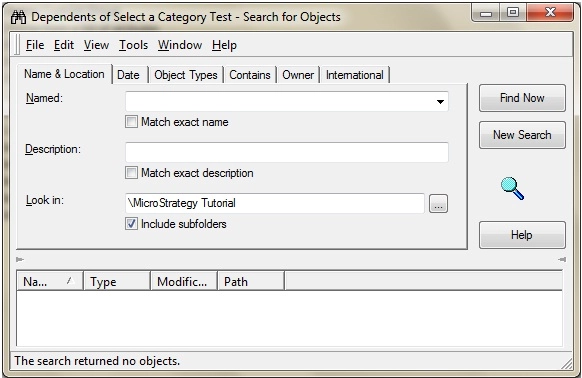
However, the search for dependents does not returns any objects as illustrated below:
 

ka02R000000kcI5QAI_0EM440000002DtB.jpeg

 
CAUSE:
 One possible causes of this issue is that there are managed objects that are dependent  of the prompt .
 
 
ACTION:
 
Delete the unused managed objects ('Administration' from the toolbar -> 'Projects') from the environment before proceeding to delete the prompt objects.


Comment

0 comments

Details

Knowledge Article

Published:

May 15, 2017

Last Updated:

May 15, 2017