In versions prior to Strategy Intelligence Server 9.0.2, when an Intelligent Cube is published, it is loaded into memory only on the node where the cube is published. When a remote accesses this cube, the cube is loaded into memory of the remote node at that time. For more information, refer to the following Strategy Knowledge Base document:
KB31352: How does Intelligent Cube caching work in a clustered Strategy 9.x and 10.x environment
Starting with Strategy Intelligence Server 9.0.2, it is possible to load an Intelligent Cube into memory on all the nodes of the cluster, after the Intelligent Cube finishes publication on one node.
Note: In a clustered environment, it is recommened to have the Backup frequency set to the default value of 0 minutes. This setting can be found under the Strategy Intelligence Server Configuration > Server Definition > Advanced. In cases where a non-zero value is used, problems can be seen with cache/cube synchronization across the cluster.
This feature can be enabled at the project level or at the Intelligent Cube level. At the project level, it is available in the project configuration under Intelligent Cubes > General options as shown below. This setting also control whether the Intelligent Cube will be loaded on the remote nodes in the cluster.
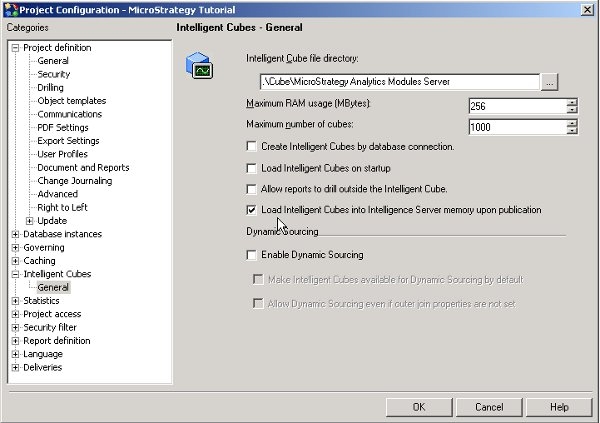
At the Intelligent Cube level, it is available in the Data menu under 'Configure Intelligent Cube'. The option will be enabled once the 'Use default project-level settings' is unchecked.

