EducationSoftwareStrategy.com
StrategyCommunity

Knowledge Base

Product

Community

Knowledge Base

TopicsBrowse ArticlesDeveloper Zone

Product

Download SoftwareProduct DocumentationSecurity Hub

Education

Tutorial VideosSolution GalleryEducation courses

Community

GuidelinesGrandmastersEvents
x_social-icon_white.svglinkedin_social-icon_white.svg
Strategy logoCommunity

© Strategy Inc. All Rights Reserved.

LegalTerms of UsePrivacy Policy
  1. Home
  2. Topics

KB35196: The option to delete a project is grayed out in MicroStrategy Developer 9.x


Stefan Zepeda

Salesforce Solutions Architect • Strategy


Users may need to delete a project in MicroStrategy Developer 9.x, but are unable to because when they right mouse click the project, they notice the Delete option is grayed out

SYMPTOM:
 
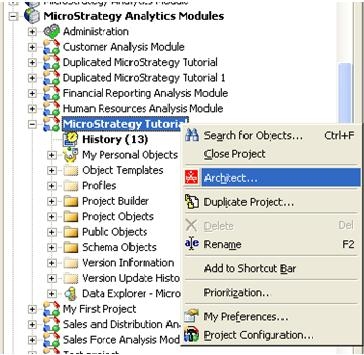
Users may need to delete a project in Strategy Developer 9.x, but are unable to because when they right mouse click the project, they notice the Delete option is grayed out as shown below:
 

ka02R000000kc6LQAQ_0EM440000002DsI.jpeg


CAUSE:
 
One possible reason behind this is the user attempting to perform the Delete is logged into the project.
 
ACTION:
 
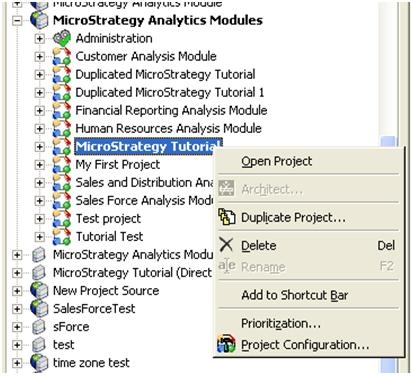
Ensure all users, including the user attempting to delete the project are logged out.  The option will now be available.
 

ka02R000000kc6LQAQ_0EM440000002DsH.jpeg


Comment

0 comments

Details

Knowledge Article

Published:

May 27, 2017

Last Updated:

May 27, 2017