EducationSoftwareStrategy.com
StrategyCommunity

Knowledge Base

Product

Community

Knowledge Base

TopicsBrowse ArticlesDeveloper Zone

Product

Download SoftwareProduct DocumentationSecurity Hub

Education

Tutorial VideosSolution GalleryEducation courses

Community

GuidelinesGrandmastersEvents
x_social-icon_white.svglinkedin_social-icon_white.svg
Strategy logoCommunity

© Strategy Inc. All Rights Reserved.

LegalTerms of UsePrivacy Policy
  1. Home
  2. Topics

KB35294: In MicroStrategy Developer 9.4.1 - 10.x, is it possible to enforce custom password policies upon end-users?


Stefan Zepeda

Salesforce Solutions Architect • Strategy


This article describes how to enforce custom password policies upon end-users

 
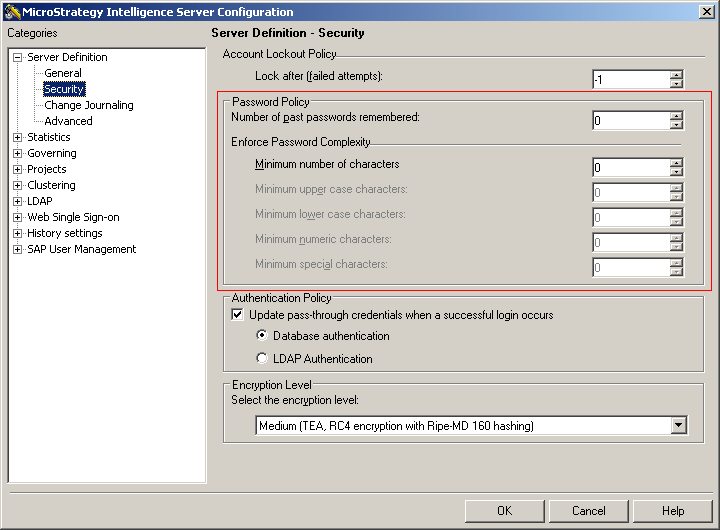
In Strategy Developer 9.4.1 - 10.xx, it is possible to enforce custom password policies upon end-users. These policies can be configured through Strategy Desktop, under Project Source (right-click) > Configure Strategy Intelligence Server > Server Definition > Security > Password Policy as shown below.
 

ka02R000000kYUPQA2_0EM440000002Drx.png

Following are the various password policies that can be enabled.

  • Number of past passwords remembered: the number of previous passwords (per user) that the Intelligence Server holds in memory. A user can sometimes use a password that is identical to one that was previously used by that same user. This setting prevents the user from doing so.
  • Enforce Password Complexity: various options that enforce specific policies on the characters of a user's password. You can remove a limit by setting any of these options to zero.
     
    • Minimum number of characters: The minimum length of the password. In order to enable the other options, this value must be set to greater than zero.
    • Minimum upper case characters: The minimum number of password characters that must be upper case (A-Z).
    • Minimum lower case characters: The minimum number of password characters that must be lower case (a-z).
    • Minimum numeric characters: The minimum number of password characters that must be numeric (0-9).
    • Minimum special characters: The minimum number of password characters that must be non-alphanumeric (symbol).


Comment

0 comments

Details

Knowledge Article

Published:

June 8, 2017

Last Updated:

June 8, 2017