SYMPTOM:
When setting up integrated authentication also known as Kerberos authentication, the end users receives the following error message when trying to logging into Strategy Web:

No valid credentials provided

Valid Kerberos Token Starts with YII:

When the error message above happens "No Valid Credentials Provided" if we have Fiddler open we will see that the token being passed is a NTLM type token instead of a Kerberos token
NTLM Token starts with TIRM:

The reason for the above behavior is that the system attempts authentication by using the Kerberos protocol but it fails. As a result, the system attempts to authenticate by using NTLM. Windows Server 2003, Windows XP, and Windows 2000 use an algorithm called Negotiate (SPNEGO) to negotiate which authentication protocol is used. Although the Kerberos protocol is the default, if the default fails, Negotiate will try NTLM.
ACTION:
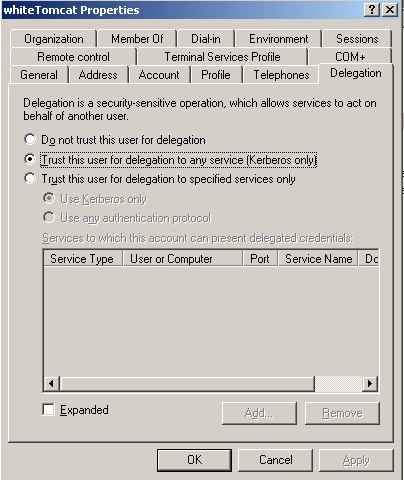
There are many possible reasons why a client browser may be unable to get a Kerberos token, but a common cause for this behaviour is that the user created in the Active Directory (or kdc) for the web server service does not have the "Trust this user for delegation" option enabled.
Make sure the user in the active directory for the web server service HTTP/ is trusted for delegation, like shown below:
Third Party Software Installation WARNING
The third-party product(s) discussed in this technical note is manufactured by vendors independent of Strategy. Strategy makes no warranty, express, implied or otherwise, regarding this product, including its performance or reliability.
KB35297
