EducationSoftwareStrategy.com
StrategyCommunity

Knowledge Base

Product

Community

Knowledge Base

TopicsBrowse ArticlesDeveloper Zone

Product

Download SoftwareProduct DocumentationSecurity Hub

Education

Tutorial VideosSolution GalleryEducation courses

Community

GuidelinesGrandmastersEvents
x_social-icon_white.svglinkedin_social-icon_white.svg
Strategy logoCommunity

© Strategy Inc. All Rights Reserved.

LegalTerms of UsePrivacy Policy
  1. Home
  2. Topics

KB35325: Project preference modification at project level doesn't populate to all the Web Servers in MicroStrategy Web 9.x and later.


Community Admin

• Strategy


This article describes a behavior in MicroStrategy Web whereby a changes to project-level Web Preferences are not propagated across other MicroStrategy Web cluster nodes.

SYMPTOM: 
After changing the project preference at project level on one of the Web Servers, user may notice the modification doesn't populate to the other Web Servers, as shown below: 
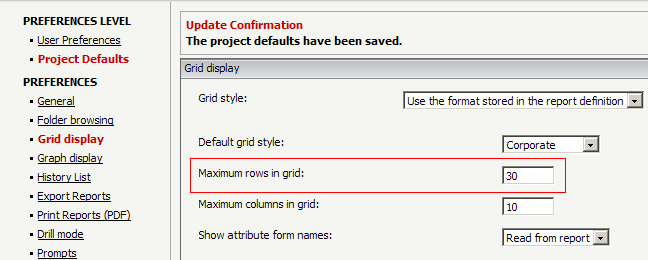
  • Web Server A
     
ka04W000000OgWxQAK_0EM4400000027ld.png
  •  Web Server B
     
ka04W000000OgWxQAK_0EM4400000027lb.png

 
CAUSE: 
This behavior is by design. The servers are not using live synchronizations to improve perormance aspects. Eventually after the Web Caches expire, the parameter values will be loaded from the metadata and the servers will be in sync.
 
ACTION: 
 

  • Open the "Purge Caches" page from the following URL:
    • ASP Version: http://Web_Server/MicroStrategy/asp/Admin.aspx?pg=purgecaches
    • JSP Version: http://Web_Server/MicroStrategy/servlet/mstrWebAdmin?pg=purgecaches
  • Check the "Purge Web Caches" check box and click on "Purge" button, as shown below:
     
ka04W000000OgWxQAK_0EM4400000027le.png
  • Then the preference on Web Server B will be reloaded from metadata and notice it's consistent with Web Server A now, as shown below: 
     
ka04W000000OgWxQAK_0EM4400000027lc.png

Comment

0 comments

Details

Knowledge Article

Published:

June 16, 2017

Last Updated:

June 16, 2017