EducationSoftwareStrategy.com
StrategyCommunity

Knowledge Base

Product

Community

Knowledge Base

TopicsBrowse ArticlesDeveloper Zone

Product

Download SoftwareProduct DocumentationSecurity Hub

Education

Tutorial VideosSolution GalleryEducation courses

Community

GuidelinesGrandmastersEvents
x_social-icon_white.svglinkedin_social-icon_white.svg
Strategy logoCommunity

© Strategy Inc. All Rights Reserved.

LegalTerms of UsePrivacy Policy
  1. Home
  2. Topics

KB35327: Is it possible to track the client machine used to connect to MicroStrategy Web?


Community Admin

• Strategy


Each time a user is logging in MicroStrategy Web, a new entry is created on the “IS_SESSION_STATS” table on the Statistics database. It is possible to identify this kind of entry because MicroStrategy is logging the IP address of the Web machine (WEBMACHINE column) and the event source = 6 (EVENTSOURCE column).
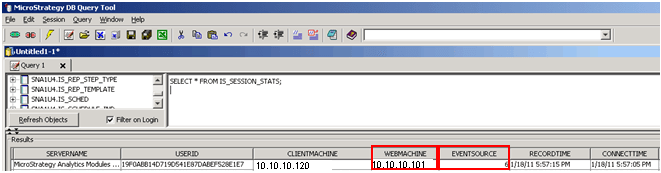
Each time a user is logging in Strategy Web, a new entry is created on the “IS_SESSION_STATS” table on the Statistics database. It is possible to identify this kind of entry because Strategy is logging the IP address of the Web machine (WEBMACHINE column) and the event source = 6 (EVENTSOURCE column).
 

ka04W000000OgtcQAC_0EM440000002AjR.png

 
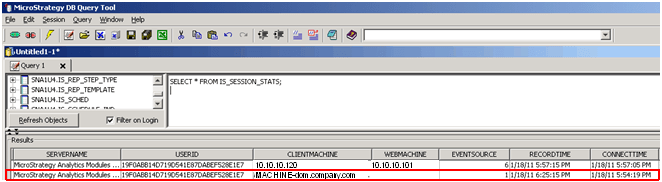
We can make a distinction between this entry and an entry created using Strategy Desktop. Users can see an empty entry on the WEBMACHINE column and EVENTSOURCE = 1 when connecting trough Strategy Desktop.
 

ka04W000000OgtcQAC_0EM440000002AjN.png


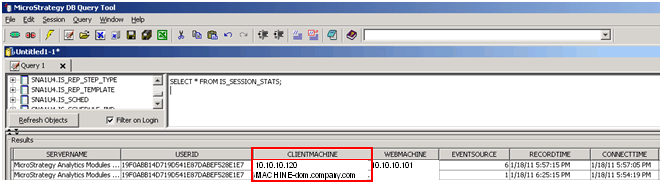
Once a Strategy Web login is identified on the IS_SESSION_STATS table, users can refer to CLIENTMACHINE column in order to find the IP address from where the session is getting created.
 

ka04W000000OgtcQAC_0EM440000002AjL.png


Comment

0 comments

Details

Knowledge Article

Published:

June 8, 2017

Last Updated:

June 8, 2017