EducationSoftwareStrategy.com
StrategyCommunity

Knowledge Base

Product

Community

Knowledge Base

TopicsBrowse ArticlesDeveloper Zone

Product

Download SoftwareProduct DocumentationSecurity Hub

Education

Tutorial VideosSolution GalleryEducation courses

Community

GuidelinesGrandmastersEvents
x_social-icon_white.svglinkedin_social-icon_white.svg
Strategy logoCommunity

© Strategy Inc. All Rights Reserved.

LegalTerms of UsePrivacy Policy
  1. Home
  2. Topics

KB35341: How to switch layouts in a multi-layout document using URL API in MicroStrategy Mobile


Community Admin

• Strategy


SYMPTOM:
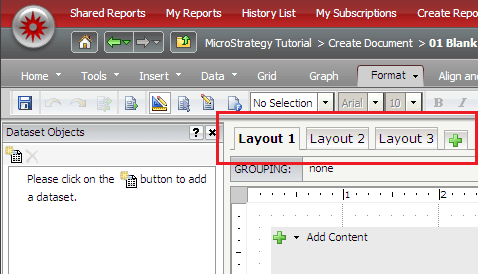
A multi-layout document is a Report Services Document with more than one layout or tab as in the image below:
ka04W00000148ZDQAY_0EM440000002UuN.png

In some circumstances, the user may want to use URL API to go from one layout to another.
ACTION:
To configure a link for opening a specific layout of a multi-layout document in Strategy Mobile 9.4.x or later for iPhone and iPad, follow these steps:
  • In Strategy Web 9.4.x, copy its URL to execute the document from the Share > Link menu in the folder browsing page.
  • Open the document in Design Mode.
  • Right-click a text box or image that is going act as the link.
  • Click on Properties and Formatting > General.
  • Enable the check box "Is hyperlink" and paste the target's URL in the Hyperlink field.
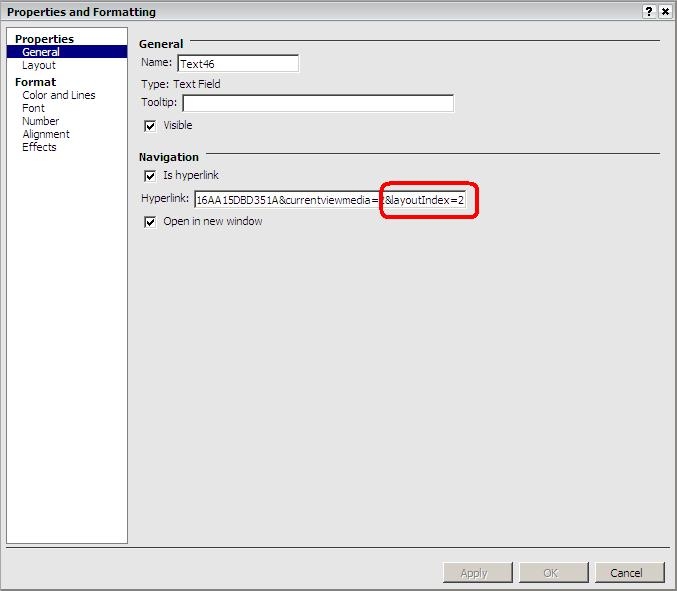
  • At the end of the URL, add the parameter "&layoutIndex=layout";
  • Replace layout with the number of the layout as in the image below:
ka04W00000148ZDQAY_0EM440000002UuM.jpeg
  • Note: The layout parameter is zero-based, which means that the first layout is 0, the second layout is 1, the third layout is 2 and so on.
  • Save the source document so the user can see the results.

 
An example URL can be found below:


Main.aspx?&src=Main.aspx.2048001&evt=2048001&visMode=0&documentID=<objectID>¤tViewMedia=2&layoutIndex=<layout>

Note: This will not work for Strategy Web 9.4.x documents it only works for Strategy Mobile 9.4.x. The link above in Strategy Web 9.4.x will rerun the document and display the default layout in the document ignoring the layoutIndex parameter.
For more information related to Strategy Web, refer to the following Knowledge Base article KB320054: New feature - URL API parameter to run a VI dashboard with a specified sheet selected for a new parameter introduced in Strategy Web 10.6.


Comment

0 comments

Details

Knowledge Article

Published:

July 13, 2017

Last Updated:

July 13, 2017