EducationSoftwareStrategy.com
StrategyCommunity

Knowledge Base

Product

Community

Knowledge Base

TopicsBrowse ArticlesDeveloper Zone

Product

Download SoftwareProduct DocumentationSecurity Hub

Education

Tutorial VideosSolution GalleryEducation courses

Community

GuidelinesGrandmastersEvents
x_social-icon_white.svglinkedin_social-icon_white.svg
Strategy logoCommunity

© Strategy Inc. All Rights Reserved.

LegalTerms of UsePrivacy Policy
  1. Home
  2. Topics

KB35377: The column Creation Time does not show in User Manager in MicroStrategy Developer


Stefan Zepeda

Salesforce Solutions Architect • Strategy


This article notes an issue with display columns in Developer

SYMPTOM:
In Strategy Developer, open Strategy Developer Preferences, navigate to Browsing option, check the option "Creation Time", the column Creation Time is displayed for objects in details view window, as shown below:
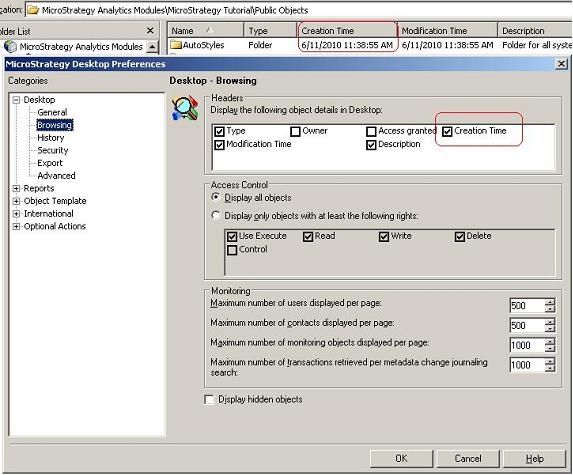
 

ka02R000000kZNWQA2_0EM440000002Drb.jpeg

 
But it cannot be displayed in the window of User Manager, as shown below:
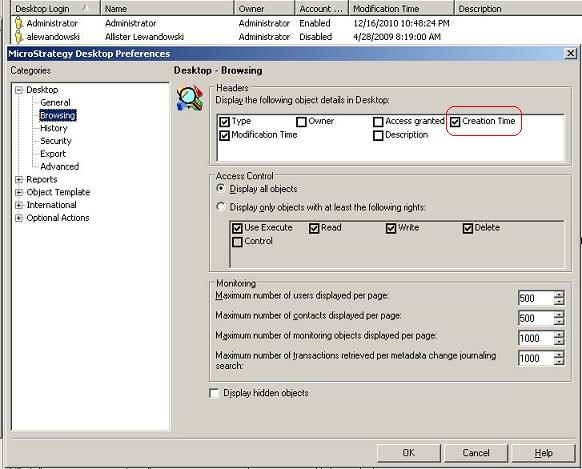
 

ka02R000000kZNWQA2_0EM440000002Drh.jpeg

 
CAUSE:
This is a known issue in Strategy. Currently the browse settings only apply to within projects and as such do not apply to any of the administration area sections of a metadata.
 
ACTION:
Currently this issue is being reviewed by Strategy for a potential code fix on an upcoming Strategy release. 
 
WORKAROUND:
Follow the steps below to display the column Creation Time for all users in Strategy Command Manager:
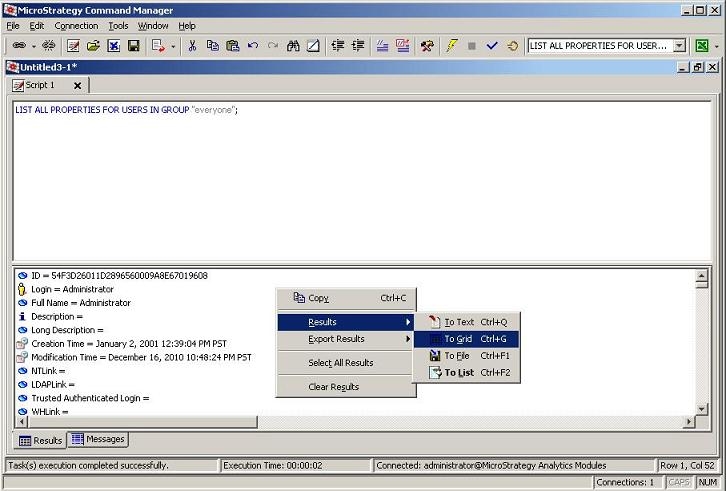
 

  • In Strategy Command Manager, execute the command:
     
    LIST ALL PROPERTIES FOR USERS IN GROUP "everyone";
  • In result section, right-click mouse and choose Result ->To Grid, as shown below:
     
ka02R000000kZNWQA2_0EM440000002Drj.jpeg
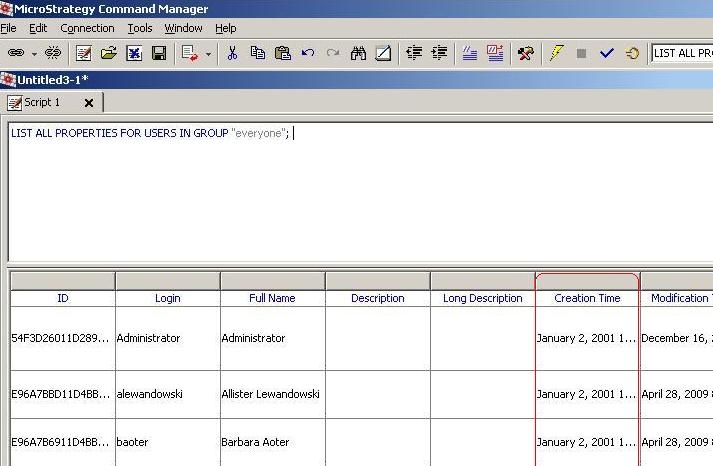
  • The list view of Creation Time shows in the result, as shown below:
ka02R000000kZNWQA2_0EM440000002DrP.jpeg

NOTE: The grid can be exported to excel or other preferred formats.


Comment

0 comments

Details

Knowledge Article

Published:

June 15, 2017

Last Updated:

June 15, 2017