EducationSoftwareStrategy.com
StrategyCommunity

Knowledge Base

Product

Community

Knowledge Base

TopicsBrowse ArticlesDeveloper Zone

Product

Download SoftwareProduct DocumentationSecurity Hub

Education

Tutorial VideosSolution GalleryEducation courses

Community

GuidelinesGrandmastersEvents
x_social-icon_white.svglinkedin_social-icon_white.svg
Strategy logoCommunity

© Strategy Inc. All Rights Reserved.

LegalTerms of UsePrivacy Policy
  1. Home
  2. Topics

KB35395: How to apply image threshold on grid subtotal when exporting to Excel from MicroStrategy Web 9.x?


Community Admin

• Strategy


This article outlines how to apply image threshold on grid subtotal when exporting to Excel from MicroStrategy Web 9.x.

Images sometimes does not show in the subtotal section when export to Excel. This article demonstrates one working example on how to apply image in threshold and make sure it will display in subtotal section in Excel.
 
1) Image reference. The recommend image reference is to use HTTP reference other than relative/absolute directory. In this way the image is accessible from one or more client machine when exporting to Excel. One test user can do is the Strategy logo image provided on Strategy.com
http://www.microstrategy.com/graphics/homepage/homepage_logo.gif
2) When reference the image, make sure to use the "Advanced Threshold Editor" on Web and choose "apply on both metric and subtotal" to make sure that the image displays on both location. See screenshot below:


ka04W00000147spQAA_0EM4400000027mK.jpeg

 
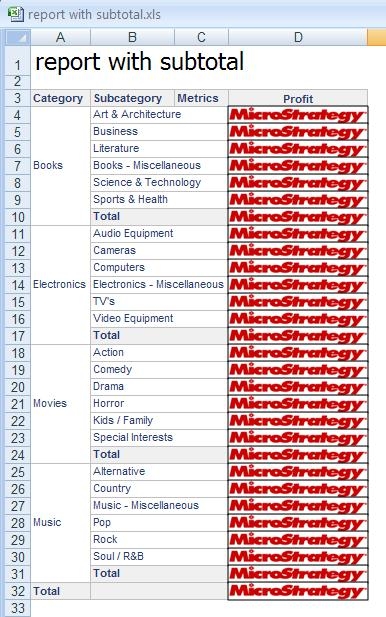
3) Check "embed image as picture" in the export options. The image should display in exported Excel book on both grid and subtotal section:
 

ka04W00000147spQAA_0EM4400000027mJ.jpeg


Comment

0 comments

Details

Knowledge Article

Published:

June 15, 2017

Last Updated:

November 10, 2019