EducationSoftwareStrategy.com
StrategyCommunity

Knowledge Base

Product

Community

Knowledge Base

TopicsBrowse ArticlesDeveloper Zone

Product

Download SoftwareProduct DocumentationSecurity Hub

Education

Tutorial VideosSolution GalleryEducation courses

Community

GuidelinesGrandmastersEvents
x_social-icon_white.svglinkedin_social-icon_white.svg
Strategy logoCommunity

© Strategy Inc. All Rights Reserved.

LegalTerms of UsePrivacy Policy
  1. Home
  2. Topics

KB35417: ScanMD failed to fix known metadata logical inconsistencies in MicroStrategy 9.x


Community Admin

• Strategy


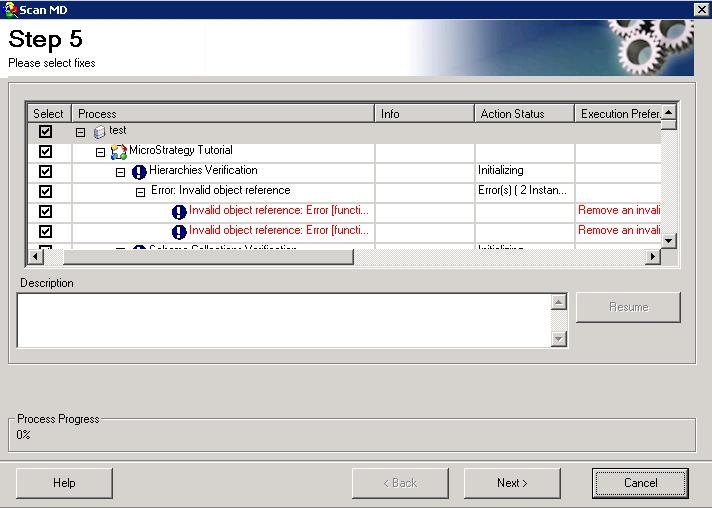
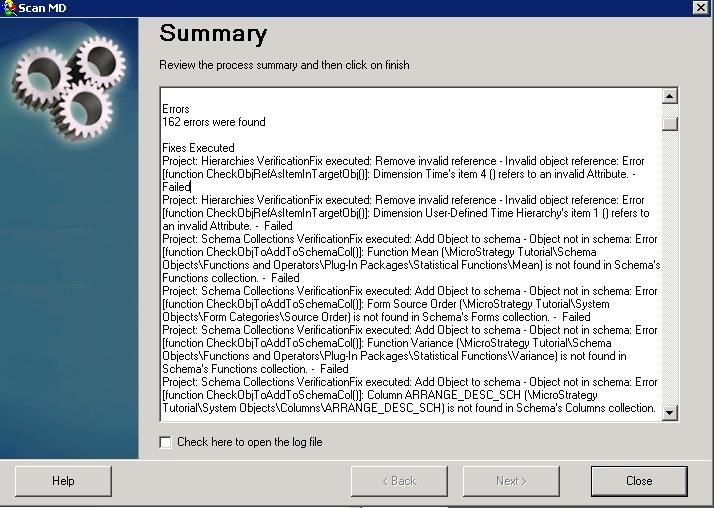
When running ScanMD against a metadata, inconsistencies are discovered. Selecting all the inconsistencies and click Next to fix, but failed.

SYMPTOM:
When running ScanMD against a metadata, inconsistencies are discovered as shown below:
ka04W000000ObaQQAS_0EM440000002DqU.jpeg

 
Selecting all the inconsistencies and click Next to fix, but failed as shown below:
ka04W000000ObaQQAS_0EM440000002DqS.jpeg

CAUSE:
One possible cause for this issue is the project schema is locked. Once it is locked by one session, it cannot be changed by another session.
 
ACTION:
Release the schema lock. If the user does not know in which session the project schema is locked, edit any schema object from Desktop, like any attribute, and close the editor, the schema lock will be removed automatically.


Comment

0 comments

Details

Knowledge Article

Published:

June 1, 2017

Last Updated:

June 1, 2017