EducationSoftwareStrategy.com
StrategyCommunity

Knowledge Base

Product

Community

Knowledge Base

TopicsBrowse ArticlesDeveloper Zone

Product

Download SoftwareProduct DocumentationSecurity Hub

Education

Tutorial VideosSolution GalleryEducation courses

Community

GuidelinesGrandmastersEvents
x_social-icon_white.svglinkedin_social-icon_white.svg
Strategy logoCommunity

© Strategy Inc. All Rights Reserved.

LegalTerms of UsePrivacy Policy
  1. Home
  2. Topics

KB35434: How to trim leading and trailing white space for warehouse element data using MicroStrategy Web


Community Admin

• Strategy


How to trim leading and trailing white space for warehouse element data using MicroStrategy Web.

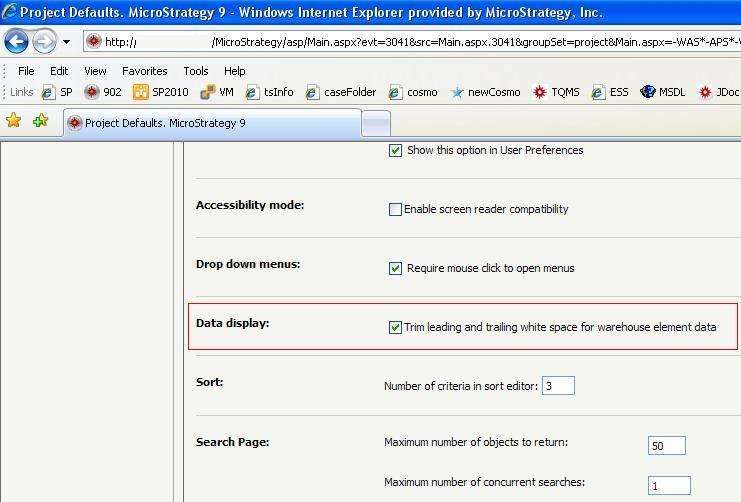
Leading and trailing white spaces in element data from warehouse often causes display issues in Web. A preference setting has been created to trim the leading and trailing white spaces for warehouse element data.
 
This preference is located under: Preferences --> Project Default --> General --> Display: Trim leading and trailing white space for warehouse element data (as shown below):
 

ka04W000000OcxeQAC_0EM4400000027m3.jpeg


Comment

0 comments

Details

Knowledge Article

Published:

June 26, 2017

Last Updated:

June 26, 2017