Dynamic default selection is a new feature introduced in Strategy 9.0.2. Since it includes "first n" or "last n" elements dynamically, determining the order of all elements becomes a key factor. This document describes how Analytical Engine resolves the order of all elements in different scenarios.
Scenario 1. Single selector targeting at single Grid
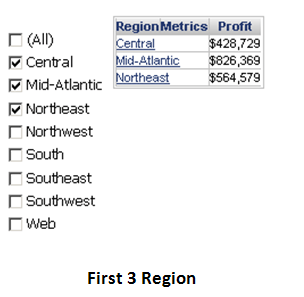
When there is only one attribute, the sorting follows the attribute default order. For example, in the Tutorial MD, Region is ascending sorted by description and Call Center ascending sorted by ID, as shown below:
Note: NULL is ‘the smallest’ in selector element sorting if DisplayNullOnTop = True in VLDB setting of the underlying report, ‘the greatest’ if DisplayNullOnTop = False. For the sorting of consolidation/custom group/derived element, it is similar to attribute, since in dashboard they are all treated in the same way as attribute.
Scenario 2. Multiple selectors targeting at single grid
When there are two or more attribute selectors, the sorting is in a successive fashion and the sequence of selectors matters. One of the advanced properties of the target grid is selector order. The change of it (in edit/editable mode, right mouse click on the grid, pick ‘Properties and Formatting’ and choose ‘Advanced’ panel) directly affects the result of dynamic default selection.
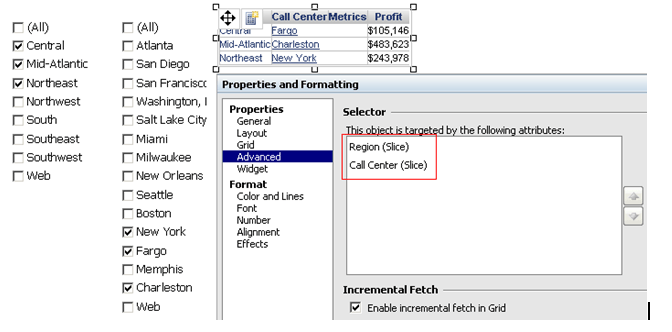
Use the following dashboard to illustrate. The grid is composed of Region, Call Center and Profit. There are two selectors targeting at the grid. The first selector is on Region. The second is on Call Center, as shown below.
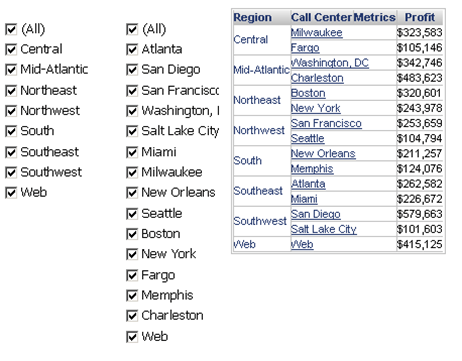
a) Two slicing selectors, Region’s selector on top of Call Center’s.
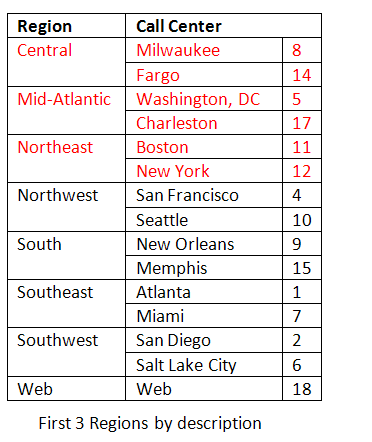
Region selector is using first 3 and Call Center selector is using last 3. Analytical engine first finds the first 3 Regions by description and then chooses the last 3 Call Centers by ID among the first 3 Regions, as shown below:
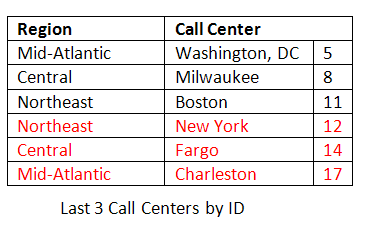
The final result is shown as below:
b) Two slicing selectors, Call Center’s selector on top of Region’s
Region selector is using first 3 and Call Center selector is using last 7. This time engine first finds the last 7 Call Centers by ID and then chooses by description the first 3 Regions from the Regions that these last 7 Call Centers belong to, as shown below:
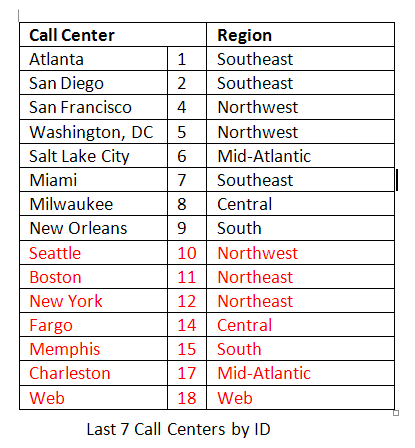
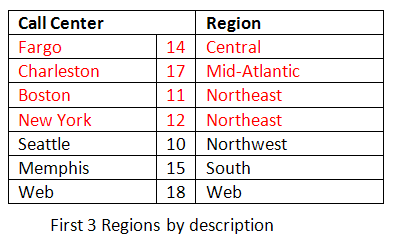
The final result is shown as below:
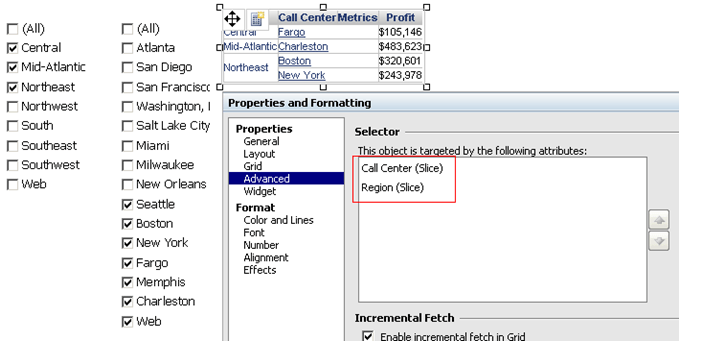
Note: although all the last 7 Call Center elements are checked in the selector, the grid only displays those belong to the first 3 Regions.
c) Filter and slicing selectors mixed, regardless of selector sequence
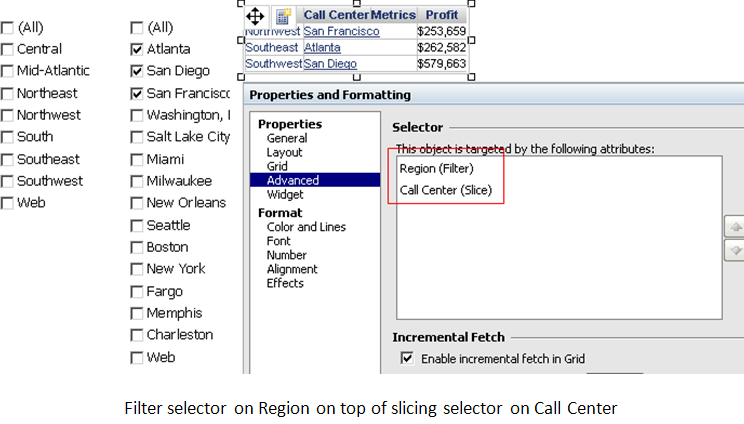
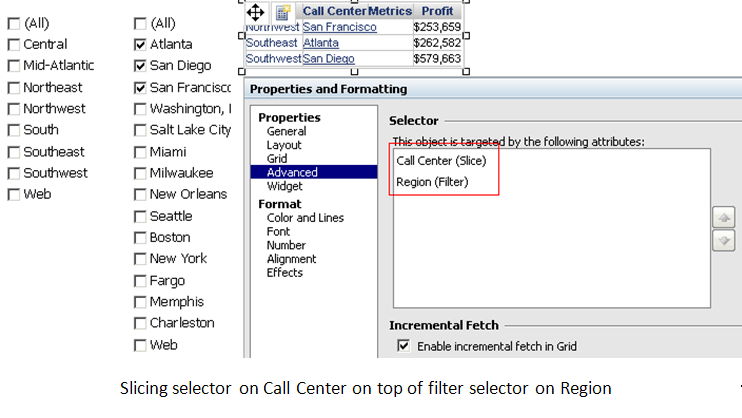
A filter selector is equivalent to a view filter on the grid. Therefore in a filter-and-slicing-mixed situation, filter selector is applied before dynamic default selection and only slicing selectors contribute to selector element sorting, regardless of the filter selector in the sequence. For example, no matter that it is unset filter selector on Region on top of use-first-3 selector on Call Center or use-first-3 selector on Call Center on top of unset filter selector on Region, the result is the first 3 Call Centers by ID, as shown below:
Scenario 3. Multiple grids targeted by the same selector
When a selector targets at multiple grids, each grid shows its own first/last n data. For the element in selector, when and only when all the grids have all the same current elements can the selector’s current elements be decided and shown.
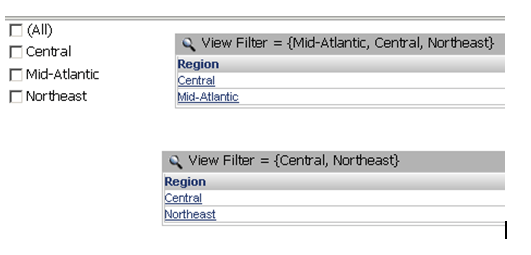
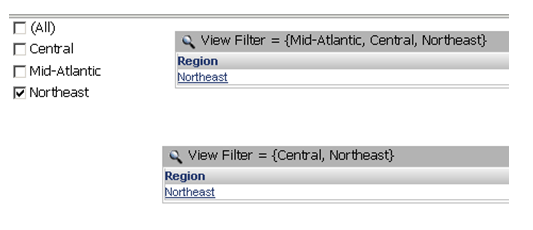
Suppose that there are two grids based on the same dataset on Region. Grid1 has view filter = {Central, Mid-Atlantic, Northeast} and Grid2 has view filter = {Central, Northeast}. A slicing selector is targeting at both Grid1 and Grid2. Recall that for Region, the order is by description = {Central, Mid-Atlantic, Northeast}.
When the dynamic default selection is set to "use first 2", the current elements in Grid1 and Grid2 are different, so the selector is empty, as shown below:
When the dynamic default selection is set to "use last 1. The current element in Grid1, Northeast, is the same as that in Grid2. Therefore, the selector shows it, as shown below:
When the grids come from different datasets, the joining setting (primary, secondary) affects the data in the grids as well.
