EducationSoftwareStrategy.com
StrategyCommunity

Knowledge Base

Product

Community

Knowledge Base

TopicsBrowse ArticlesDeveloper Zone

Product

Download SoftwareProduct DocumentationSecurity Hub

Education

Tutorial VideosSolution GalleryEducation courses

Community

GuidelinesGrandmastersEvents
x_social-icon_white.svglinkedin_social-icon_white.svg
Strategy logoCommunity

© Strategy Inc. All Rights Reserved.

LegalTerms of UsePrivacy Policy
  1. Home
  2. Topics

KB35767: HTML tags and Line breaks are not applied to object descriptions in MicroStrategy Web 9.x and 10.x


Community Admin

• Strategy


This technical note describes why HTML tags and line breaks are not applied to object descriptions in MicroStrategy Web 9.x and 10.x. There are Security settings on the MicroStrategy Web Administrator page that need to be enabled in order for this to function properly.

SYMPTOM:
When HTML tags and line breaks are applied to the description of reports or documents or any folder in Strategy Web 9.3.x and 10.x, the change is not reflected and the description displays the actual HTML tag or code.
 
STEPS TO REPRODUCE
 
In Strategy Web 9.x and 10.x
  • Create a report with an attribute and a metric and save it.
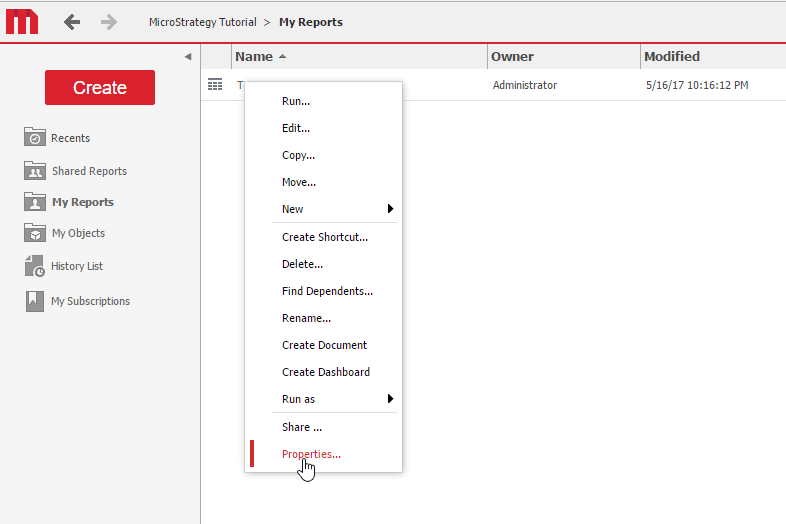
  • Right click on the report in the folder browser and click on "Properties", as shown below.
ka04W000000OhXEQA0_0EM440000002Lut.png
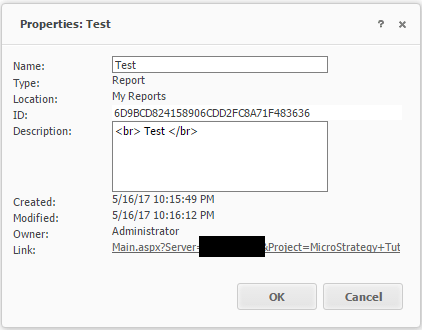
  • In the Properties window, go to the "Description" section and enter line breaks or HTML tags, as shown in the screenshot below:
ka04W000000OhXEQA0_0EM440000002Lv8.png
  • Click OK.  The change will not be reflected and the actual HTML code will display in the Description section
ka04W000000OhXEQA0_0EM440000002Lv3.png

CAUSE:
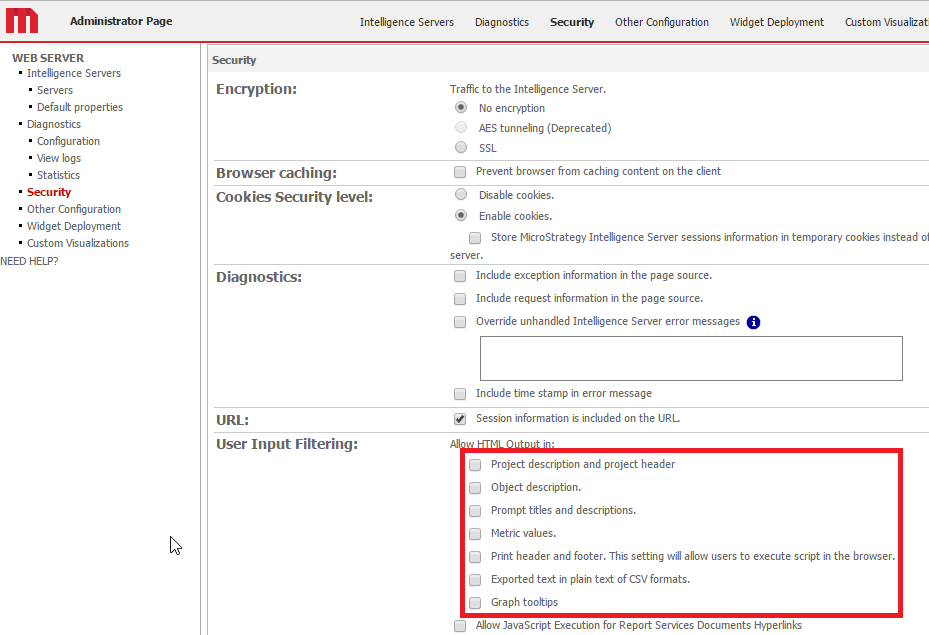
By default, the "Allow HTML Output in" option under the Strategy Web Administrator -> Security page is unchecked for all options. This is due to security concerns with cross site scripting (XSS) or malicious injection of code into description sections.
ka04W000000OhXEQA0_0EM440000002LvD.png


ACTION: 
Enable any optons for which html code and tags is desired. After checking the option, the HTML tags or line breaks will display properly.


Comment

0 comments

Details

Knowledge Article

Published:

May 16, 2017

Last Updated:

May 16, 2017