EducationSoftwareStrategy.com
StrategyCommunity

Knowledge Base

Product

Community

Knowledge Base

TopicsBrowse ArticlesDeveloper Zone

Product

Download SoftwareProduct DocumentationSecurity Hub

Education

Tutorial VideosSolution GalleryEducation courses

Community

GuidelinesGrandmastersEvents
x_social-icon_white.svglinkedin_social-icon_white.svg
Strategy logoCommunity

© Strategy Inc. All Rights Reserved.

LegalTerms of UsePrivacy Policy
  1. Home
  2. Topics

KB35793: How to create mobile subscription with Alert Push Notification using MicroStrategy Mobile App 9.0.2 Patch 8 and later


Community Admin

• Strategy


This document shows instructions on how to create mobile subscription with Alert Push Notification using MicroStrategy Mobile App 9.0.2 Patch 8 and later

Alert push notification has been introduced in Strategy Mobile App 9.0.2 Patch 8 and later. The following steps illustrates how to create mobile subscription with Alert Push Notification.
 
NOTE: Before creating mobile subscription with Alert Push Notification, make sure Push Notification has been enabled according to KB35792: How to enable Alert Push Notification when using MicroStrategy Mobile 9.0.2 and later.
 
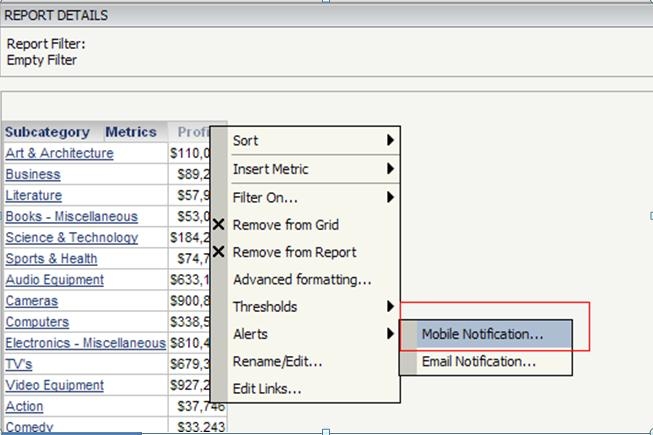
First, execute a report with at least one attribute and one metric,
right click on the metric to display the right mouse click menu
Select Alerts -> Mobile Notification
 

ka04W000001MKvSQAW_0EM440000002AQX.jpeg

 
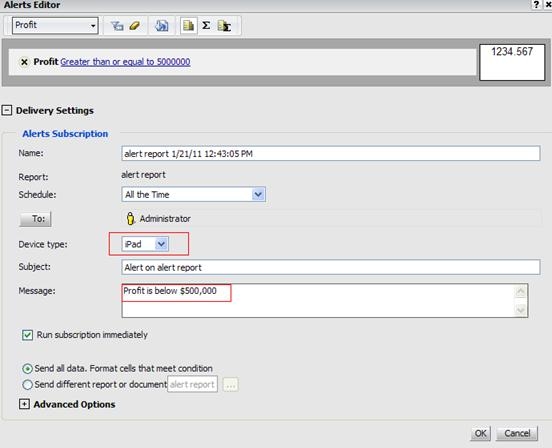
Second: Alerts Editor displays, 
Select Device type as iPad
Enter alert message that will be pushed along with the notification
Check Run Subscription immediately
Click OK.
 

ka04W000001MKvSQAW_0EM440000002AQZ.jpeg

 
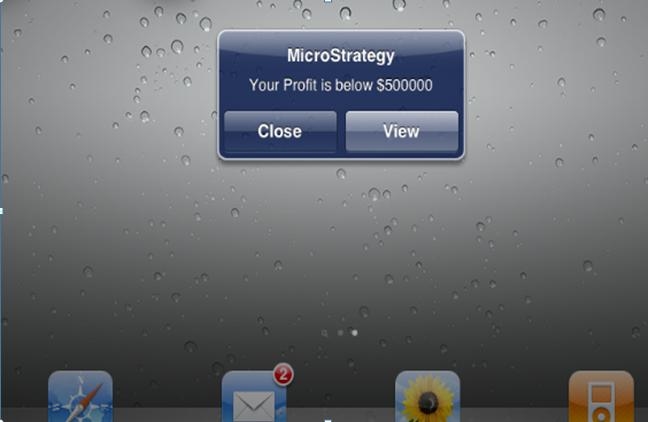
After this Alert Mobile Subscription is triggered, user will see a notification on their iPad (as shown below)
 

ka04W000001MKvSQAW_0EM440000002AQU.jpeg

 
NOTE: Strategy application does not need to be running to receive this alert.


Comment

0 comments

Details

Knowledge Article

Published:

April 3, 2017

Last Updated:

April 3, 2017