EducationSoftwareStrategy.com
StrategyCommunity

Knowledge Base

Product

Community

Knowledge Base

TopicsBrowse ArticlesDeveloper Zone

Product

Download SoftwareProduct DocumentationSecurity Hub

Education

Tutorial VideosSolution GalleryEducation courses

Community

GuidelinesGrandmastersEvents
x_social-icon_white.svglinkedin_social-icon_white.svg
Strategy logoCommunity

© Strategy Inc. All Rights Reserved.

LegalTerms of UsePrivacy Policy
  1. Home
  2. Topics

KB35799: When using the tilde symbol (~) in attribute element prompts, the tilde symbol is not being recognized and incorrect data is displayed in MicroStrategy 9.0.x


Community Admin

• Strategy


SYMPTOM:
If the tilde (~) symbol is used in attribute elements, then using the attribute in an attribute element prompt within reports, even though the results display fine in Strategy Desktop, in Strategy Web the tilde (~) symbol is not recognized and wrong data is returned. This happens only if  the attribute with tilde (~) is used in element prompts, not as a general display issue in web.
 
 
STEPS TO REPRODUCE:
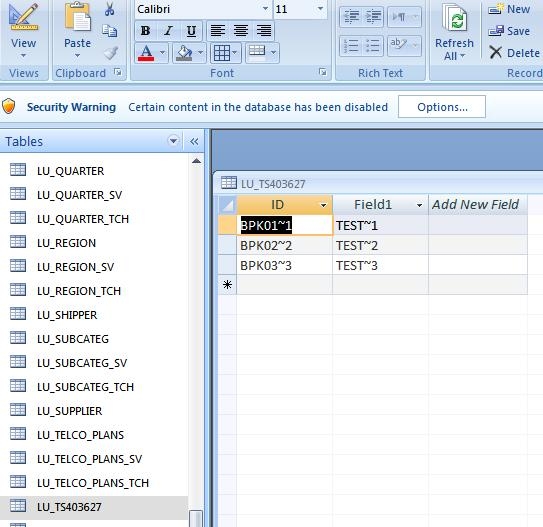
  • Create a new table where there is an ID and DESC column with text data type and include the ~ symbol in the name of the ID column elements and the DESC column elements.


ka04W000000OcdKQAS_0EM4400000027j8.jpeg
  • In MSTR Desktop create an attribute based off of the new table (assuming the table has been added via WH Catalog) with ID and DESC forms that include the ~ symbol in the elements. Make sure to set the ID and DESC as display forms.
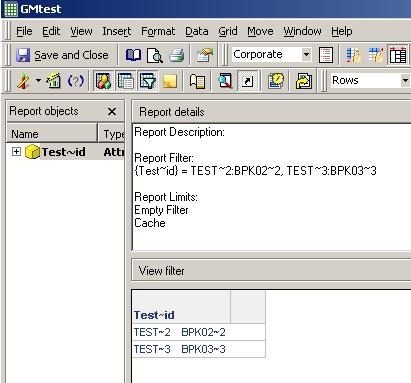
  • Create an attribute element prompt based off the attribute created above and place it in a new report as the report filter and place the attribute in the grid.  Run the report in Desktop and choose 2 of the attribute elements, notice how the report displays fine with the ~ symbol.


ka04W000000OcdKQAS_0EM4400000027jO.jpeg


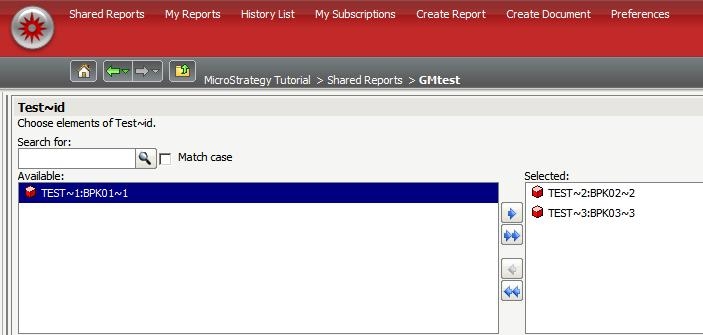
  • When run the same report in Strategy web, and choose the same elements the results cannot be returned on the report because the ~ symbol is not recognized.
ka04W000000OcdKQAS_0EM4400000027jQ.jpeg


CAUSE:
This is a known issue in Strategy Web 9.0.x.
 
ACTION:
Please contact Strategy Technical Support for a status on this issue.


Comment

0 comments

Details

Knowledge Article

Published:

July 18, 2017

Last Updated:

July 18, 2017