EducationSoftwareStrategy.com
StrategyCommunity

Knowledge Base

Product

Community

Knowledge Base

TopicsBrowse ArticlesDeveloper Zone

Product

Download SoftwareProduct DocumentationSecurity Hub

Education

Tutorial VideosSolution GalleryEducation courses

Community

GuidelinesGrandmastersEvents
x_social-icon_white.svglinkedin_social-icon_white.svg
Strategy logoCommunity

© Strategy Inc. All Rights Reserved.

LegalTerms of UsePrivacy Policy
  1. Home
  2. Topics

KB35802: A cross join occurs even when the fact of the metric is extended to the attribute in a report in MicroStrategy SQL Generation Engine


Community Admin

• Strategy


This article describes a scenario where a cross join can occur with fact extensions

SYMPTOM:
When a fact's source tables do not exist at a specific attribute level but it is needed for calculation, a fact extension can be utilized. However, a cross join can still occur if the attribute in the fact extension and a metric based on the fact are placed in the same report.
 
STEPS TO REPRODUCE:
The issue is reproduced in Strategy Tutorial project with the steps below:
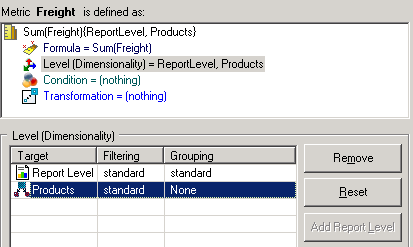
  • Create a metric based on the freight fact which is extended to Item attribute with fact extension. Add "Products" user hierarchy to the metric level and set the grouping option to "None", as shown below:
ka04W000000OhjsQAC_0EM440000002DmJ.png
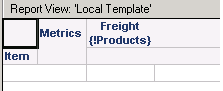
  • Create a new report, add item attribute in the row and the metric in step 1 in the column, as shown below:
ka04W000000OhjsQAC_0EM440000002DmG.png
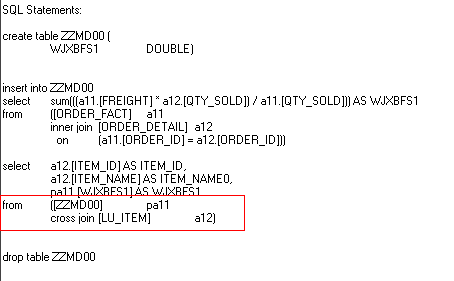
  • The SQL of the report is shown as below:
ka04W000000OhjsQAC_0EM440000002DmH.png
  • Note: Attribute "Item" belongs to "Products" user hierarchy. Products hierarchy grouping by none is resolved as "Item" grouping by "None" in this report.

CAUSE:
One possible cause of the issue is that either the attribute in the fact extension, or the user hierarchy which the attribute is in is added to the metric level with the "Grouping" option set to "None". The level metric definition conflicts with the fact extension on the same attribute. Therefore, a cross join is introduced to run a report with the attribute and the metric in the template.
 
ACTION:
User should have a clear understanding on what kind of report is required. If the cross join is not needed and the fact extension is required to take effect, change the grouping by "None" to "Standard" or remove the related attribute or user hierarchy from the level metric. Taking the report above as an example, when the grouping for the "Products" user hierarchy is set to "standard", the SQL for the report is as shown below:

ka04W000000OhjsQAC_0EM440000002Dm8.png


Comment

0 comments

Details

Knowledge Article

Published:

April 17, 2017

Last Updated:

April 17, 2017