EducationSoftwareStrategy.com
StrategyCommunity

Knowledge Base

Product

Community

Knowledge Base

TopicsBrowse ArticlesDeveloper Zone

Product

Download SoftwareProduct DocumentationSecurity Hub

Education

Tutorial VideosSolution GalleryEducation courses

Community

GuidelinesGrandmastersEvents
x_social-icon_white.svglinkedin_social-icon_white.svg
Strategy logoCommunity

© Strategy Inc. All Rights Reserved.

LegalTerms of UsePrivacy Policy
  1. Home
  2. Topics

KB35820: "MISSING: PRINT SPOOLER SERVICE" message is obtained when installing MicroStrategy components on Windows.


Community Admin

• Strategy


"MISSING: PRINT SPOOLER SERVICE" message is obtained when installing Microstrategy components on Windows.

SYMPTOM:
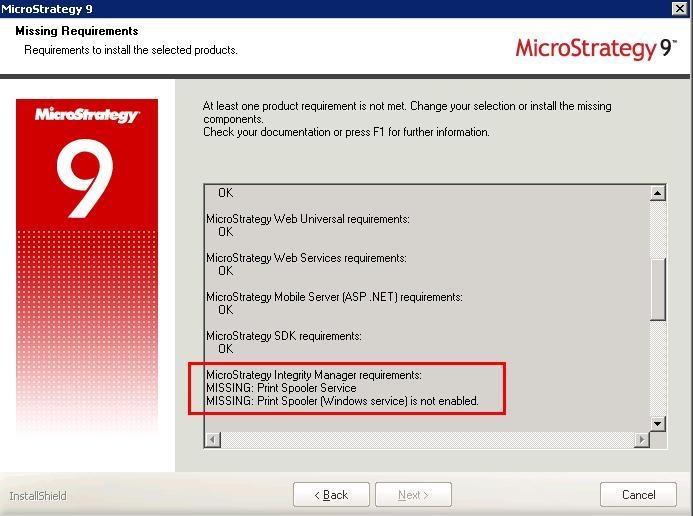
When installing Strategy components on Windows, the requirement check fails for the Integrity Manager component with the following message:


"MISSING: Print Spooler Service"
 

ka04W000000OcbdQAC_0EM440000002Wfa.jpeg

The installation cannot continue if this message is obtained.
 
CAUSE:
The Print Spooler service is disabled on the machine.
 
ACTION:
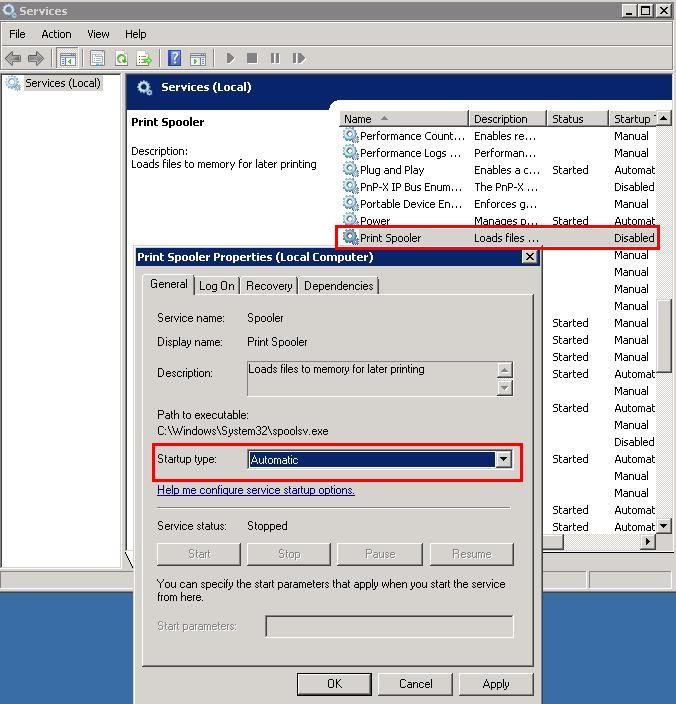
Go to Administrative Tools ->Services ->Print Spooler -> Properties and verify that  the Print Spooler Service is enabled 
ka04W000000OcbdQAC_0EM440000002WfZ.jpeg

 
Ensure that the service is set to Automatic, start the service and restart the Strategy installer to retry the installation.
 
Third Party Software Installation:
WARNING:
The third-party product(s) discussed in this technical note is manufactured by vendors independent of Strategy. Strategy makes no warranty, express, implied or otherwise, regarding this product, including its performance or reliability.


Comment

0 comments

Details

Knowledge Article

Published:

July 21, 2017

Last Updated:

July 21, 2017