EducationSoftwareStrategy.com
StrategyCommunity

Knowledge Base

Product

Community

Knowledge Base

TopicsBrowse ArticlesDeveloper Zone

Product

Download SoftwareProduct DocumentationSecurity Hub

Education

Tutorial VideosSolution GalleryEducation courses

Community

GuidelinesGrandmastersEvents
x_social-icon_white.svglinkedin_social-icon_white.svg
Strategy logoCommunity

© Strategy Inc. All Rights Reserved.

LegalTerms of UsePrivacy Policy
  1. Home
  2. Topics

KB35828: "Attribute form specified with an attribute was not found among the attribute's forms" error occurs when using an attribute form containing special characters in MicroStrategy 9.4.1


Stefan Zepeda

Salesforce Solutions Architect • Strategy


KB35828: "Attribute form specified with an attribute was not found among the attribute's forms" error occurs when using an attribute form containing special characters in MicroStrategy 9.4.1

SYMPTOM:
When using an attribute form with special characters (including '-','/','(',')') in a custom expression filter object, the following error is received when validating the expression:
 

ka02R000000kVobQAE_0EM440000002DpG.jpeg

 
Sample Code/Error
Attribute form specified with an attribute was not found among the attribute's forms
  
 
CAUSE:
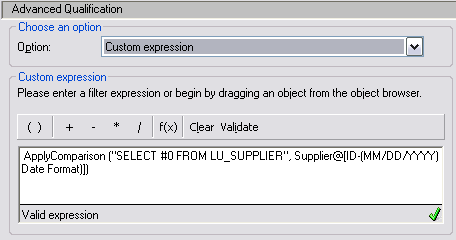
When an attribute form's name contains special characters, it is required to add a pair of square brackets around it to properly validate the expression
 
 
ACTION:
After adding square brackets to the attribute form's name, the expression can be validated properly, as shown below:
 

ka02R000000kVobQAE_0EM440000002DpA.jpeg


Comment

0 comments

Details

Knowledge Article

Published:

May 23, 2017

Last Updated:

May 23, 2017