EducationSoftwareStrategy.com
StrategyCommunity

Knowledge Base

Product

Community

Knowledge Base

TopicsBrowse ArticlesDeveloper Zone

Product

Download SoftwareProduct DocumentationSecurity Hub

Education

Tutorial VideosSolution GalleryEducation courses

Community

GuidelinesGrandmastersEvents
x_social-icon_white.svglinkedin_social-icon_white.svg
Strategy logoCommunity

© Strategy Inc. All Rights Reserved.

LegalTerms of UsePrivacy Policy
  1. Home
  2. Topics

KB35832: Different behaviors are observed for different delimiters when importing text files for attribute qualifier prompts in MicroStrategy Web.


Community Admin

• Strategy


Different behaviors are observed for different delimiters when importing text files for attribute qualifier prompts in MicroStrategy Web.

SYMPTOM
In Strategy Developer, text files imported into attribute qualifier prompts can be delimited by carriage returns, tabs, commas, and semicolons.  However, the same does not apply in Strategy Web. Different behaviors are observed for different delimiters.
 
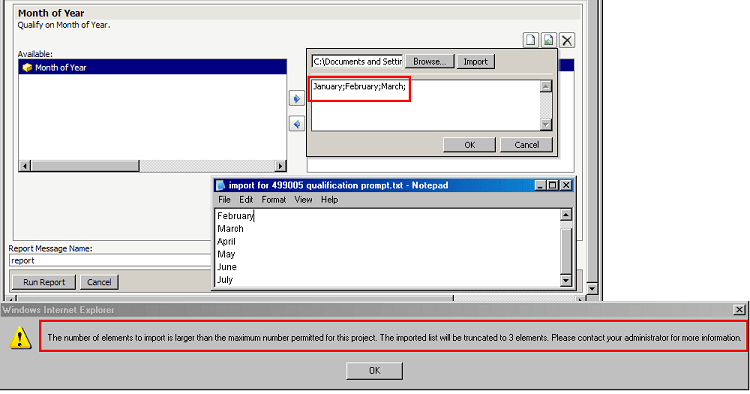
Carriage Return (semicolon (;) ): The text file will import successfully and each delimited string will be imported as a single element. All Web Preferences and Settings will be observed. In the example below, the 'Maximum number of elements to import' preference is set at 3, thus an error is encountered.
 

ka04W000000OfbAQAS_0EM4400000027jf.png

Sample Code/Error


The number of elements to import is larger than the maximum number permitted for this project.  The imported list will be truncated to 3 elemets.  Please contact your administrator for more information.


Comma (,): The text file will import successfully and each delimited string will be imported as a single element. However, the 'Maximum number of elements to import' preference will not be obeyed. This setting can be found in Project Defaults > Prompts > Element import.  In the example below, this setting is set at 3, but all 6 elements are imported with no error.
 

ka04W000000OfbAQAS_0EM4400000027jk.png

 
Tab: The text file will ignore the delimiter. The entire file will be interpreted as a single string, and the import will consist of one element as shown in the example below.
 

ka04W000000OfbAQAS_0EM4400000027je.png

 
STEPS TO REPRODUCE: 
 

  1. Create a text file with some elements of Month of Year.
  2. Create an attribute qualification prompt on the Month of Year attribute. On the qualification tab, select the checkbox for "Allow element import".
  3. Create a new report and add the prompt as the report filter. Put Month of Year in the rows of the grid.
  4. Execute the report. When answering the prompt, choose the DESC form and import the text file from Step 1. Depending on the delimiter used, users will observe the behaviors described above.

CAUSE
This is a known issue in Strategy Web 9.4.1 and above.
 
ACTION:
Strategy will continue to investigate and post updates as soon as they are available.
 
WORKAROUND:
If possible, use semicolons as the delimiter, as it imports the number of elements correctly and also obeys the maximum number of elements to import restriction.
KB35832


Comment

0 comments

Details

Knowledge Article

Published:

June 14, 2017

Last Updated:

August 6, 2018