EducationSoftwareStrategy.com
StrategyCommunity

Knowledge Base

Product

Community

Knowledge Base

TopicsBrowse ArticlesDeveloper Zone

Product

Download SoftwareProduct DocumentationSecurity Hub

Education

Tutorial VideosSolution GalleryEducation courses

Community

GuidelinesGrandmastersEvents
x_social-icon_white.svglinkedin_social-icon_white.svg
Strategy logoCommunity

© Strategy Inc. All Rights Reserved.

LegalTerms of UsePrivacy Policy
  1. Home
  2. Topics

KB35840: How to migrate MDX objects and MDX compound metrics using MicroStrategy Object Manager 9.x - 10.x?


Community Admin

• Strategy


This technical note provides the steps to migrate MDX Compound metrics using MicroStrategy Object Manager

SYMPTOM:
After creating new compound MDX metrics or making modifications to existing MDX metrics, Strategy Object Manager Project Comparison functionality does not report these changes and therefore does not give the option to Replace the existing MDX metrics with their new definition in the destination project and does not move the new compound MDX metrics.
 
CAUSE:
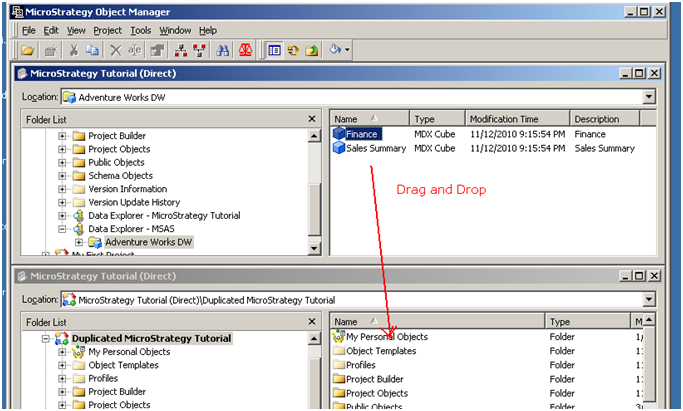
Object Manager's Project Comparison feature does not support MDX objects. MDX objects should be migrated through the regular Object Manager interface as shown in the screenshot below:
 

ka04W000000OgmGQAS_0EM440000002DnX.jpeg

 
However, MDX compound metrics are managed by the system, and therefore cannot be directly migrated across projects. If MDX compound metrics need to be moved then one should move the Reports that depend on the compound metrics instead.


Comment

0 comments

Details

Knowledge Article

Published:

June 9, 2017

Last Updated:

June 9, 2017