Strategy Web 9.x includes the ability of embedding flash fonts in Report Services documents in order to display rotated text and labels on Flash mode and Flash exported documents.
1.- Embedding the font for Flash mode display
To embed a font to be displayed on Flash mode in a Strategy Web document, the font file needs to be copied to the swf folder under the folder where the Strategy Web application has been deployed on the Web Server machine.
For instance, assuming that you are using Apache Tomcat as the application server, installed on the following path:
/home/techsupp/apache-tomcat/
The application will then be deployed on the following path:
/home/techsupp/apache-tomcat/webapps/Strategy
The font file should then be copied to:
/home/techsupp/apache-tomcat/webapps/MicroStrategy/swf/
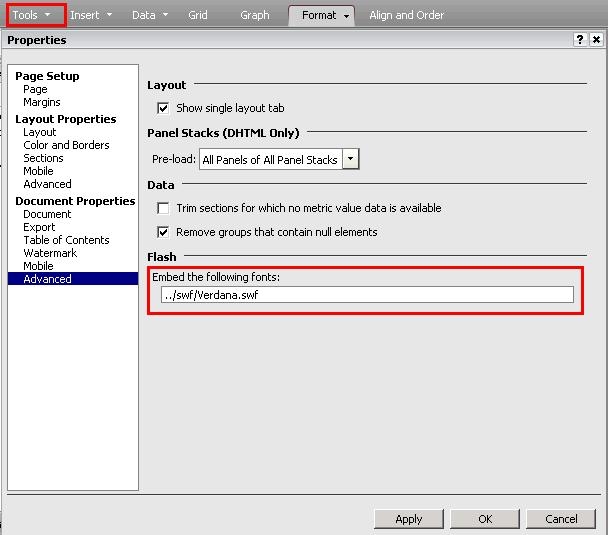
To embed the file on the document, open the document on Strategy Web, and go to Tools - Document Properties - Advanced. On the embedded fonts text box, insert the relative path to the font file. For instance, if you have copied the font file Verdana.swf to the path above, enter
../swf/Verdana.swf
2.- Embedding the font for Flash exported mht file display
When exporting to flash mode the swf font file needs to be copied on a specific location on the Intelligence Server machine, as the exporting is performed by the Intelligence Server that will need access to the font file in order to embed it correctly on the exported document.
On Windows, the file should be placed in general in the following path:
C:\Program Files\Common Files\MicroStrategy\swf
The drive letter and exact location can depend on the installation options. To check the exact path where the systems looks for files used to generate Flash exports, please check the registry as explained on the technical note below:
KB34261: How can images be correctly displayed in exported documents, when using a relative path in MicroStrategy Intelligence Server 9.x and newer
The file should then be placed on the swf folder under the "Common Path" for flash obtained from the registry.
When the Intelligence Server is installed on Unix/Linux platform, to embed the font on the exported mht file, copy the swf file on the following path on the Intelligence Server machine :
<Strategy>/install/swf/
where <Strategy> is the root folder where the Strategy applications have been installed. For instance, if the application was installed on:
/home/techsupp/Strategy
The font file should be copied to:
/home/techsupp/MicroStrategy/install/swf/
