EducationSoftwareStrategy.com
StrategyCommunity

Knowledge Base

Product

Community

Knowledge Base

TopicsBrowse ArticlesDeveloper Zone

Product

Download SoftwareProduct DocumentationSecurity Hub

Education

Tutorial VideosSolution GalleryEducation courses

Community

GuidelinesGrandmastersEvents
x_social-icon_white.svglinkedin_social-icon_white.svg
Strategy logoCommunity

© Strategy Inc. All Rights Reserved.

LegalTerms of UsePrivacy Policy
  1. Home
  2. Topics

KB35866: How to override project login mode settings when the login mode is modified accidentally in Web Preference in MicroStrategy Web 10.x?


Community Admin

• Strategy


This knowledge base article explains the Microstrategy Web Administrator setting "Override project login mode settings".

An administrator user may accidentally modify the allowed login modes via the Project Preferences > Project Defaults > Security, which prevents users login Strategy Web 9.0.x.
 
For example, in a project which is only configured to use Standard Authentication Mode, when the login mode is changed to use Windows Authentication accidentally via the Project Preferences > Project Defaults > Security, no users are able to login Strategy Web. The following error appears when users login a project in Strategy Web:

ka04W000000OeAtQAK_0EM4400000027jE.jpeg


Error in login
You cannot login as Windows User. Please ask the Strategy Server Administrator to link this Windows User account to a Strategy Server User or ask them to set the Web Server properly.

When above issue happens, no users are able to login to the project in Strategy Web to change the authentication mode.
 
However, in Strategy Web 10.x, the project login mode settings can be overridden from Web Administrator > Default properties > Login, as shown in the image below:
 

ka04W000000OeAtQAK_0EM4400000027jA.jpeg

 
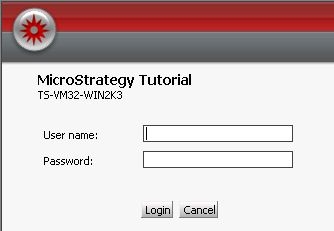
By choosing the Standard Authentication Mode, selecting the option "Override project login mode settings" and saving the changes, the Standard Authentication Mode will be available for all users in Strategy Web, as shown in the image below:
 

ka04W000000OeAtQAK_0EM4400000027jC.jpeg


Comment

0 comments

Details

Knowledge Article

Published:

June 13, 2017

Last Updated:

June 13, 2017