EducationSoftwareStrategy.com
StrategyCommunity

Knowledge Base

Product

Community

Knowledge Base

TopicsBrowse ArticlesDeveloper Zone

Product

Download SoftwareProduct DocumentationSecurity Hub

Education

Tutorial VideosSolution GalleryEducation courses

Community

GuidelinesGrandmastersEvents
x_social-icon_white.svglinkedin_social-icon_white.svg
Strategy logoCommunity

© Strategy Inc. All Rights Reserved.

LegalTerms of UsePrivacy Policy
  1. Home
  2. Topics

KB35878: "Request timed out" error message appears when importing large .csv file to answer prompts in MicroStrategy Web 10.x


Pascal Deguine

Principal Product Specialist • Strategy


"Request timed out" error message appears when importing large .csv file to answer prompts in Web, and the user may notice the time-out appears after exactly 50 seconds.

Description:

"Request timed out" error message appears when importing large .csv file to answer prompts in Web, and the user may notice the time-out appears after exactly 50 seconds, as shown below:
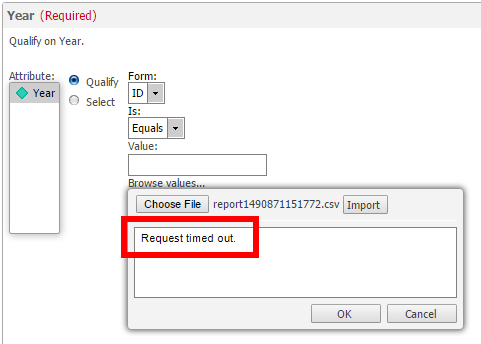
 

ka02R000000g2dxQAA_0EM440000002Hsf.png


Why is this happening?

The prompt element import timeout defaults to 50 seconds.
 

Solution:

Increase the default timeout to a higher value by following the steps below:

  1. Open the file "FrameProcessor.xml" under [WEB_DEPOYMENT_FOLDER]\WEB-INF\xml\blocks. 
  2. Locate to the following entry:   


    <property name="timeout">50000</property>


  3. The value is set in milliseconds. Increase the value to allow larger CSV file import.
  4. Restart the Web Server for the setting to take effect.


Comment

0 comments

Details

Knowledge Article

Published:

April 4, 2017

Last Updated:

September 12, 2019