EducationSoftwareStrategy.com
StrategyCommunity

Knowledge Base

Product

Community

Knowledge Base

TopicsBrowse ArticlesDeveloper Zone

Product

Download SoftwareProduct DocumentationSecurity Hub

Education

Tutorial VideosSolution GalleryEducation courses

Community

GuidelinesGrandmastersEvents
x_social-icon_white.svglinkedin_social-icon_white.svg
Strategy logoCommunity

© Strategy Inc. All Rights Reserved.

LegalTerms of UsePrivacy Policy
  1. Home
  2. Topics

KB35909: Count metrics are being aggregated at undesired levels causing aggregatable nulls to display when attributes are being removed from the template in MicroStrategy 9.x.


Stefan Zepeda

Salesforce Solutions Architect • Strategy


Count metrics are being aggregated at undesired levels causing aggregatable nulls to display when attributes are being removed from the template in MicroStrategy 9.x.

SYMPTOM:
 
When creating a count distinct metric on an attribute, the report will return aggregatable null values when any attribute is removed from the template.  The metric will display correct values when every attribute is on the template, but as soon as any attribute is removed from the template the report returns aggregatable nulls.
 
STEPS TO REPRODUCE:
 
The desired results of this report is to count the distinct subcategories despite what level the report is.  Follow the steps below to reproduce this issue in Strategy Tutorial:
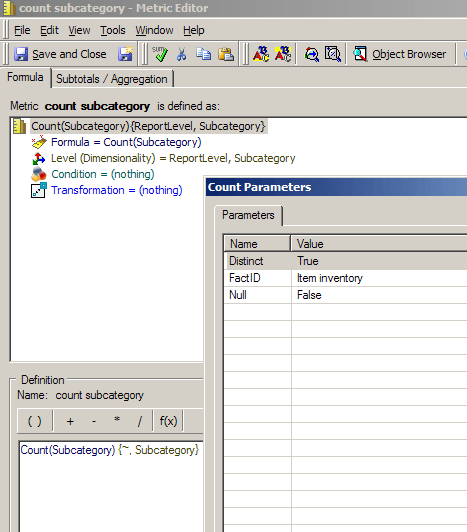
  • Create a new metric and define it as Count(Subcategory).  Set the count parameters to Distinct = True and have the FactID set at 'Item inventory'.  Add the attribute Subcategory to the level of the metric and leave the filtering and grouping as standard.
     
ka02R000000kcKQQAY_0EM440000002DnK.png
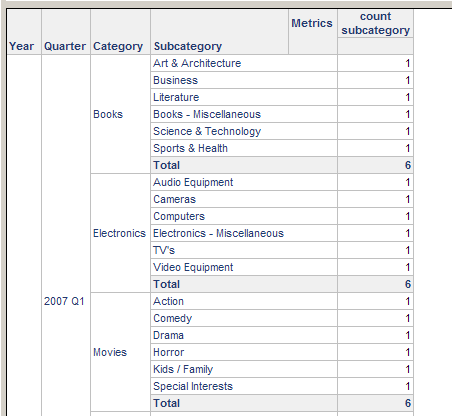
  • Create a new report with Year, Quarter, Category, Subcategory and the new metric created in step 1.  Place all of these on the report and note the results:
     
ka02R000000kcKQQAY_0EM440000002DnP.png
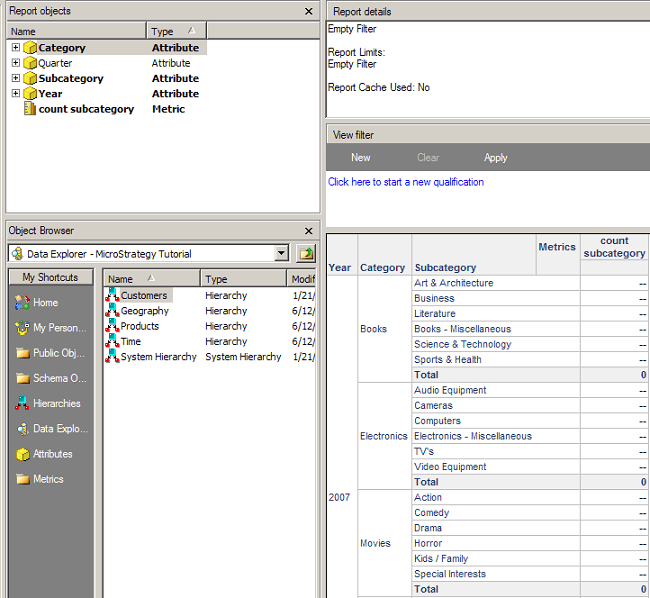
  • Remove the Quarter attribute from the template and place it in the report objects window.  Notice the count values are now aggregatable nulls:
     
ka02R000000kcKQQAY_0EM440000002DnN.png

CAUSE:
 
The reason this report is returning aggregatable nulls is because the metric is improperly defined.  When the metric has the level of the metric to include the report level, this means that the lowest level of each hierarchy is to be considered in the calculation.  In this example, the only level that matters is the subcategory which is not in the time hierarchy.
 
ACTION:
 
For the report to return the desired results, the subcategory is the only level that needs to be set. Therefore, remove the report level from the metric 
Additionaly, change the 'Dynamic aggregation function:'  of the metric to Sum rather than Default.


Comment

0 comments

Details

Knowledge Article

Published:

May 11, 2017

Last Updated:

May 11, 2017