It can be useful to embed dynamic reports within an HTML Document in order to maintain certain functionality in a report such as pivot, sort, drilling, outline mode and page by.
To achieve the display of dynamic reports in a Strategy HTML document we will insert an iFrame on the HTML document using XSL and will set the source property of the iFrame to point at the report we want to dynamically display.
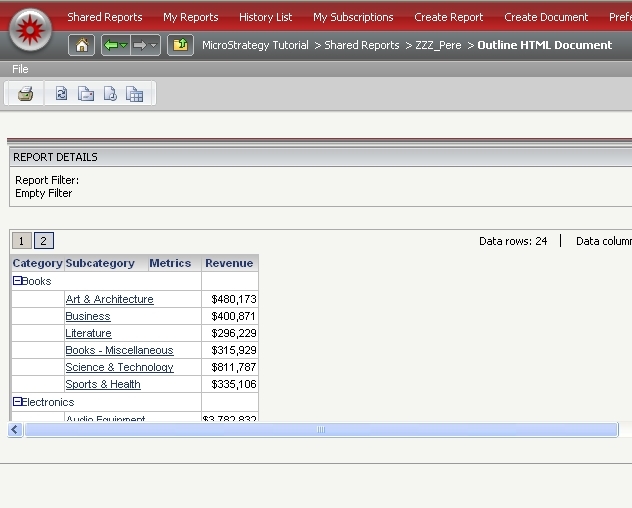
Use the following XSL applied to the report inserted in the HTML document to be embedded in an iFrame:
XSL
<xsl:stylesheet xmlns:xsl="http://www.w3.org/1999/XSL/Transform" version="1.0">
<xsl:output omit-xml-declaration="yes" />
<xsl:template match="/">
<iframe>
<xsl:attribute name="src">main.aspx?pg=reportNoHeaderNoFooterNoPathNoToolbar&messageID=<xsl:value-of select="/mi/im/@mid" /></xsl:attribute>
<xsl:attribute name="border">0</xsl:attribute>
<xsl:attribute name="width">100%</xsl:attribute>
<xsl:attribute name="height">300</xsl:attribute>
<xsl:attribute name="frameborder">0</xsl:attribute>
</iframe>
</xsl:template>
</xsl:stylesheet>
The XSL above creates an iFrame within the HTML Document. the attribute src of the iFrame is being set to mstrWeb?pg=reportNoHeaderNoFooterNoPathNoToolbar&messageID=
The page used to display the report pg=reportNoHeaderNoFooterNoPathNoToolbaris a page defined in the pageConfig.xml which does not display the report header, footer path and toolbar. This can be customized to use a different page defined in the pageConfig.
Note: The XSL used above uses the URL structure of Strategy Web Universal, to modify the code to work with Strategy Web .NET replace "mstrWeb?" with "Main.aspx?"
