EducationSoftwareStrategy.com
StrategyCommunity

Knowledge Base

Product

Community

Knowledge Base

TopicsBrowse ArticlesDeveloper Zone

Product

Download SoftwareProduct DocumentationSecurity Hub

Education

Tutorial VideosSolution GalleryEducation courses

Community

GuidelinesGrandmastersEvents
x_social-icon_white.svglinkedin_social-icon_white.svg
Strategy logoCommunity

© Strategy Inc. All Rights Reserved.

LegalTerms of UsePrivacy Policy
  1. Home
  2. Topics

KB35938: Export to PDF does not retain the formatted message defined for "Display message in document grids" in Project Configuration in MicroStrategy Developer 10.x


Stefan Zepeda

Salesforce Solutions Architect • Strategy


Export to PDF does not retain the formatted contents of HTML container based on the HTML tags in MicroStrategy Web 9.x

Starting with the release of Strategy ONE (March 2024), dossiers are also known as dashboards.
SYMPTOM:
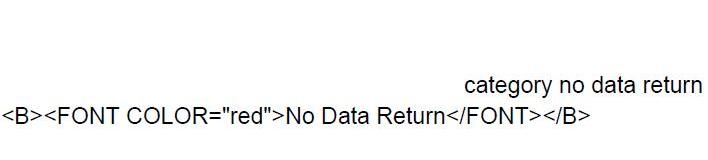
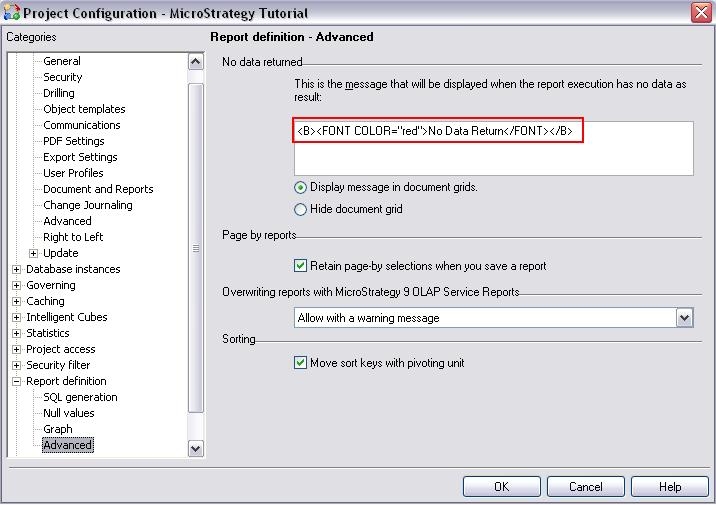
HTML tag used inside "Display message in document grids" option is not rendered as expected after the document is exported to PDF. 
 
Setting on Developer:
ka0PW0000001JPXYA2_0EM4400000027iO.jpeg

 
Export to PDF, the HTML tag is lost.

ka0PW0000001JPXYA2_0EM4400000027iR.jpeg

 
CAUSE:
HTML tags in the Project Configuration > Project Configuration > Report Definition > Advanced > Display message in document grid is supported to be rendered only in Web. Once it is exported to PDF, it appears as plain text. 
 
ACTION:
Starting from Strategy 10.3, export html tags to PDF is available when HTML Container or text box is used. Refer to KB286713 for steps to configure. However, the new feature does not support HTML tag used in Project Configuration as discussed in this article. Therefore, consider using alternative approach for "No data return" message to be shown in Report Services document, Visual Insight, or Dossier.


Comment

0 comments

Details

Knowledge Article

Published:

June 12, 2017

Last Updated:

March 21, 2024