EducationSoftwareStrategy.com
StrategyCommunity

Knowledge Base

Product

Community

Knowledge Base

TopicsBrowse ArticlesDeveloper Zone

Product

Download SoftwareProduct DocumentationSecurity Hub

Education

Tutorial VideosSolution GalleryEducation courses

Community

GuidelinesGrandmastersEvents
x_social-icon_white.svglinkedin_social-icon_white.svg
Strategy logoCommunity

© Strategy Inc. All Rights Reserved.

LegalTerms of UsePrivacy Policy
  1. Home
  2. Topics

KB35941: How to setup a dynamic text-field from an attribute form (HTML Tag, URL) to open hyperlink in Report Services Document in MicroStrategy Web


Community Admin

• Strategy


How to setup a dynamic text-field from an attribute form (HTML Tag, URL) to open hyperlink in Report Services Document in MicroStrategy Web 9.x

To display a dynamic text-field from an attribute form (HTML Tag, URL) to open an hyperlink in a Report Services Document, the following requirements must be met:
 
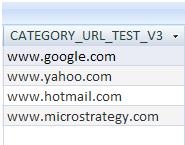
1) The data in the warehouse has to be stored with the syntax 'www.myurl.com' (i.e. without including the transmission protocol http://, it also can't be stored with the HTML anchor tag syntax '<a href="http://www.google.com">Google</a>').
ka04W000000Oe2pQAC_0EM4400000027iw.jpeg

 
2) The attribute form can be of type: HTML Tag, URL or Text
 
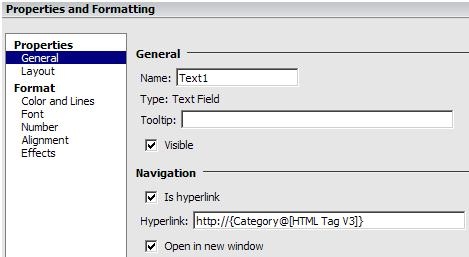
3) The syntax for the text box/text-field within the document has to be
 
RMC > Properties and Formatting > Is Hyperlink > http://{MyAttribute@}
 
e.g. 'http://{Category@}'
 

ka04W000000Oe2pQAC_0EM4400000027iu.jpeg

 
Note: It's important to note the prefix 'http://' before the dynamic text, this way Web will know that it's an absolute URL and not a relative URL
 
If all the above steps are set, the dynamic text-field from the attribute form can open an hyperlink successfully:

ka04W000000Oe2pQAC_0EM4400000027iy.jpeg


Comment

0 comments

Details

Knowledge Article

Published:

April 3, 2017

Last Updated:

April 3, 2017