EducationSoftwareStrategy.com
StrategyCommunity

Knowledge Base

Product

Community

Knowledge Base

TopicsBrowse ArticlesDeveloper Zone

Product

Download SoftwareProduct DocumentationSecurity Hub

Education

Tutorial VideosSolution GalleryEducation courses

Community

GuidelinesGrandmastersEvents
x_social-icon_white.svglinkedin_social-icon_white.svg
Strategy logoCommunity

© Strategy Inc. All Rights Reserved.

LegalTerms of UsePrivacy Policy
  1. Home
  2. Topics

KB35990: "License Manager failed to generate the activation file because the permission is denied." error message appears when activating the product in MicroStrategy License Manager 10.x in Linux environment


Community Admin

• Strategy


SYMPTOM:
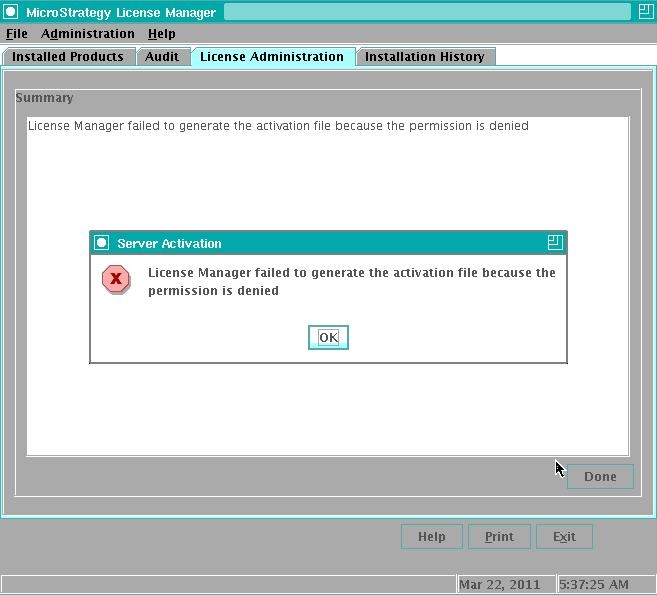
In Linux environment, after input all necessary information and click Activate in Strategy License Manager 10.x, below errors appears:
 

ka04W000000OglrQAC_0EM440000002Ah9.jpeg

 
Sample Code/Error
License Manager failed to generate the activation file because the permission is denied.
 
Click OK, the window of License Manager disappears. Below entries are caught in the Linux terminal:
Sample Code/Error
$ ./mstrlicmgr
WARNING: environment variable $MSTR_REGISTRY_FILE points to a non-writeable file '/home/mstr902/MicroStrategy/MSIReg.reg'
 
CAUSE:
The account used to activate Strategy product is different from the account used to install Strategy.
The account used to install the product could be determined form the MSIReg.reg file, as shown below:
 

ka04W000000OglrQAC_0EM440000002AhC.jpeg


ACTION:
Switch to the account used to install Strategy or use root account.


Comment

0 comments

Details

Knowledge Article

Published:

June 11, 2017

Last Updated:

June 11, 2017