EducationSoftwareStrategy.com
StrategyCommunity

Knowledge Base

Product

Community

Knowledge Base

TopicsBrowse ArticlesDeveloper Zone

Product

Download SoftwareProduct DocumentationSecurity Hub

Education

Tutorial VideosSolution GalleryEducation courses

Community

GuidelinesGrandmastersEvents
x_social-icon_white.svglinkedin_social-icon_white.svg
Strategy logoCommunity

© Strategy Inc. All Rights Reserved.

LegalTerms of UsePrivacy Policy
  1. Home
  2. Topics

KB35994: The calendar selector does not work correctly when the ID form of the Day attribute does not contain the actual dates


Community Admin

• Strategy


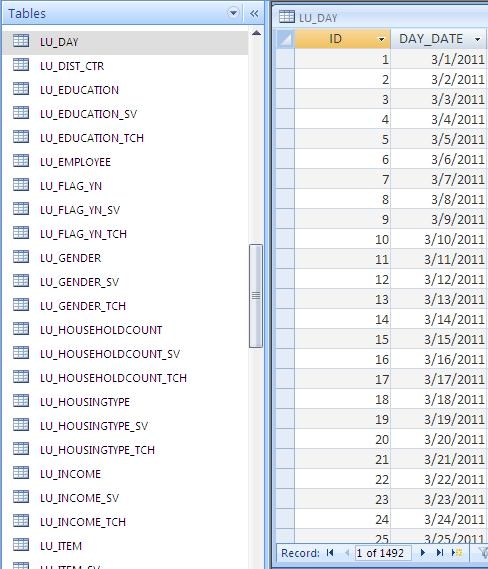
The calendar selector does not work correctly when the ID form of the Day attribute does not contain the actual dates in MicroStrategy 9.x and 10.x

SYMPTOM
Users notice that the calendar selector does not display valid available options when the Day attribute’s ID form is just a numeric list instead of containing the actual date values, in Strategy Web 9.x and 10.x, like shown below.

ka04W000000Of0VQAS_0EM4400000027iX.jpeg

 
STEPS TO REPRODUCE

  • Add a new column to the Day attribute:
ka04W000000Of0VQAS_0EM4400000027iW.jpeg
  • Create a report with this Day attribute and a metric.
  • Convert into a document.
  • Create a Day attribute selector.
  • In the layout properties, change the flash option to Calendar.
  • Run in Flash mode.

CAUSE
This is working as designed. The calendar widget was designed to look only at the ID form of the attribute and expects to have the dates in this form. When the dates are not contained by this form, the widget is not able to behave correctly.
 
ACTION
Modify the Day attribute so the ID form contains the actual dates.
 
WORKAROUND
If a grid is used as a selector and a widget is applied to the grid to display as a Date Selection, the issue will not occur.


Comment

0 comments

Details

Knowledge Article

Published:

June 16, 2017

Last Updated:

June 16, 2017