SYMPTOM:
It appears that modifying the sort order of attribute browsing elements in the Attribute Editor does not have any effect even though a schema update has been performed and the user has re-connected to the project source.
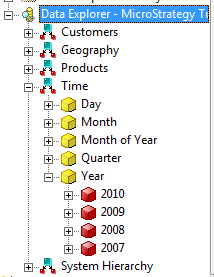
1. Default sort order of Tutorial attribute 'Year':

2. Modification of default sort order of attribute 'Year' to descending:

3. Perform a Schema Update and reconnect to the project source. Note that the sort order has not changed:

CAUSE:
Attribute elements are cached in the Auxiliary Cache and therefore no change can be observed.
ACTION:
Purge element cache in the Project Configuration.
Right-click the Project and go to Project Configuration > Caching > Auxiliary Caching > Elements. Click on 'Purge Now' in order to purge the element cache:

Reconnect to the project source and observe that the sort order has been changed: