EducationSoftwareStrategy.com
StrategyCommunity

Knowledge Base

Product

Community

Knowledge Base

TopicsBrowse ArticlesDeveloper Zone

Product

Download SoftwareProduct DocumentationSecurity Hub

Education

Tutorial VideosSolution GalleryEducation courses

Community

GuidelinesGrandmastersEvents
x_social-icon_white.svglinkedin_social-icon_white.svg
Strategy logoCommunity

© Strategy Inc. All Rights Reserved.

LegalTerms of UsePrivacy Policy
  1. Home
  2. Topics

KB36003: How to make the Day Calendar selector dynamically set to yesterday in MicroStrategy Web


Community Admin

• Strategy


Prior to MicroStrategy Web 9.0.2, selectors could only be saved with a static element as the default selection.  If a selector based off Day was executed on March 27th 2011, then the previous day (March 26th 2011) was picked, if the document was saved and then re-executed on another day (March 28th 2011) the selected element would still be March 26th and not March 27th.

SUMMARY:
Prior to Strategy Web 9.0.2, selectors could only be saved with a static element as the default selection.  If a selector based off Day was executed on March 27th 2011, then the previous day (March 26th 2011) was picked, if the document was saved and then re-executed on another day (March 28th 2011) the selected element would still be March 26th and not March 27th, like shown below:
 
March 27th Execution

ka04W00000147vGQAQ_0EM4400000027ia.jpeg

 
March 28th Execution

ka04W00000147vGQAQ_0EM4400000027ih.jpeg

 
With the introduction of the new feature in Strategy Web 9.0.2, “Use first or last N elements”, saving dynamic elements is now possible.  

ka04W00000147vGQAQ_0EM4400000027iT.jpeg

 
Using this feature, a selector can be used to default to the last element or 2 last element, or to the first or 2 first elements, depending on which value in the warehouse is equivalent to 'yesterday'.
 
Example:
If the data in the warehouse is sorted ascending, as in the image below:

ka04W00000147vGQAQ_0EM4400000027iS.jpeg

 
The selector should be set to the last element or the last 2 elements, depending on whether the latest row in the column contains the current day or not. If the data is sorted descending, then it should be the first elements.
 
The sorting in the warehouse can also be overridden by the attribute form’s browse sorting, as explained in tech note KB32916.
If this has been applied correctly, the calendar selector should now have a dynamic state as default which will advance depending on the warehouse changes, not on the actual date. Handling the daily updates of the warehouse data should be taken care of by this point by a database administrator.
 
RESTRICTIONS: 
For this functionality to work correctly, the following restrictions apply.
 

ka04W00000147vGQAQ_0EM4400000027iZ.jpeg


ka04W00000147vGQAQ_0EM4400000027ii.jpeg


  • The functionality for Current State is only available for selectors that are not set as filters:
ka04W00000147vGQAQ_0EM4400000027if.jpeg
  •  
    Note: A selector that is not applied as a filter will not allow aggregation of multiple selections. Refer to tech note KB32871 for more information on this feature and to restriction 4 in this list for more information.
    Note: An enhancement request has been logged for selectors as filters to have this functionality as well. Contact Strategy Technical Support for an update on this issue.
     
  • The functionality for Current State is only available for selectors and not for 'grid as selectors'.
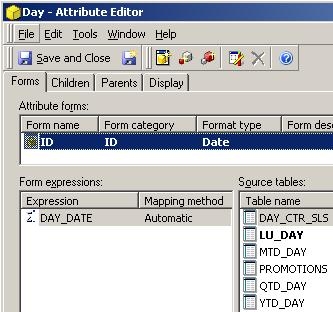
  • The Day attribute ID form should contain the actual date column.

Note: refer to tech note KB35994 for more information.

  • The Calendar selector will not allow multiple selections. Refer to tech note KB35984 for more information.

Comment

0 comments

Details

Knowledge Article

Published:

June 1, 2017

Last Updated:

March 27, 2018