When running a prompted report, at the bottom of the prompts page there are two buttons being rendered, one to run the report and one to cancel the execution.
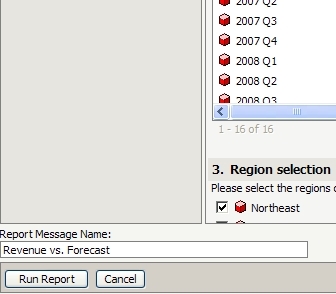
To remove the cancel button via customization follow this simple steps
Using the customizations editor, open Client-side layouts --> mstr --> layouts --> promptEditor, edit the file and comment out the section for the cancel button
Sample Code/Error
(Code Snipped)
...
</mstrlayout:wRender>
<mstrlayout:wRender name="saveButton">
</mstrlayout:wRender>
<!--<mstrlayout:wRender name="cancelButton">
</mstrlayout:wRender>-->
</td>
</tr>
...
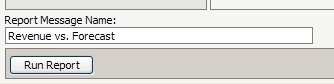
The cancel button will no longer be rendered
CUSTOMIZATION WARNING
This customization is provided as a convenience to Strategy users and is only directly applicable to the version stated. While this code may apply to other releases directly, Strategy Technical Support makes no guarantees that the code provided will apply to any future or previous builds. In the event of a code change in future builds, Strategy Technical Support makes no guarantee that an updated version of this particular customization will be provided. In the event of a code change in future builds, Strategy may not be able to provide additional code on this matter even though this customization is provided at this time for this specific build. For enhancements to this customization or to incorporate similar functionality into other versions, contact your Account Executive to inquire about Strategy consulting assistance.
