EducationSoftwareStrategy.com
StrategyCommunity

Knowledge Base

Product

Community

Knowledge Base

TopicsBrowse ArticlesDeveloper Zone

Product

Download SoftwareProduct DocumentationSecurity Hub

Education

Tutorial VideosSolution GalleryEducation courses

Community

GuidelinesGrandmastersEvents
x_social-icon_white.svglinkedin_social-icon_white.svg
Strategy logoCommunity

© Strategy Inc. All Rights Reserved.

LegalTerms of UsePrivacy Policy
  1. Home
  2. Topics

KB36044: 'Reserved error (-1001). there is no message for this error.' error message appears when running a report in MicroStrategy Developer 9.x against a Microsoft Access database.


Stefan Zepeda

Salesforce Solutions Architect • Strategy


'Reserved error (-1001). there is no message for this error.' error message appears when running a report in MicroStrategy Developer 9.x against a Microsoft Access database.

SYMPTOM:
 
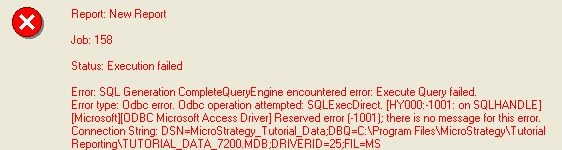
when running a report in Strategy Developer  9.x against a Microsoft Access database, following error message appears:
 

ka02R000000kX0XQAU_0EM440000002Dmq.jpeg


Error type: Odbc error. Odbc operation attempted: SQLExecDirect. Reserved error (-1001); there is no message for this error. Connection String: DSN=Strategy_Tutorial_Data;DBQ=C:\Program Files\MicroStrategy\Tutorial Reporting\TUTORIAL_DATA_7200.MDB;DRIVERID=25;FIL=MS Access;
  
CAUSE:
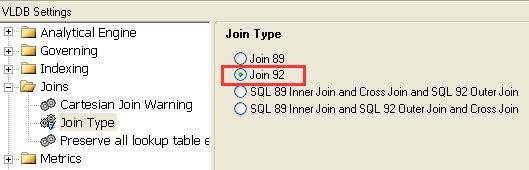
Microsoft Access does not support ANSI Join 92 and the 'Join 92' option is selected in VLDB settings of the report, as shown below:

ka02R000000kX0XQAU_0EM440000002Dmp.jpeg

 
ACTION:
Use the 'Join 89' setting which is the default option in VLDB settings.
Refer to the following technical note for more details of Join 89 and Join 92 in VLDB settings:
 
KB3872 (KB5700-7X0-0066): Join 89 versus Join 92: How to set MicroStrategy Desktop to perform a join in the FROM clause or the WHERE clause


Comment

0 comments

Details

Knowledge Article

Published:

April 12, 2017

Last Updated:

April 12, 2017