EducationSoftwareStrategy.com
StrategyCommunity

Knowledge Base

Product

Community

Knowledge Base

TopicsBrowse ArticlesDeveloper Zone

Product

Download SoftwareProduct DocumentationSecurity Hub

Education

Tutorial VideosSolution GalleryEducation courses

Community

GuidelinesGrandmastersEvents
x_social-icon_white.svglinkedin_social-icon_white.svg
Strategy logoCommunity

© Strategy Inc. All Rights Reserved.

LegalTerms of UsePrivacy Policy
  1. Home
  2. Topics

KB36071: Why can't the Indian thousands separator number format be displayed in MicroStrategy Developer 9.x and 10.x


Stefan Zepeda

Salesforce Solutions Architect • Strategy


Why can't the Indian thousands separator number format be displayed in MicroStrategy Developer 9.x and 10.x

On the Strategy Developer's client machine, perform the following steps:
 
1.     Under Regional Setting change the Region option to use English(Indian) which has the following number and currency formatting
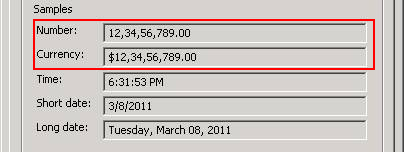
       

ka02R000000kVbFQAU_0EM440000002DmY.png

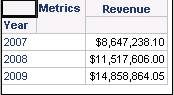
2.     In the Strategy Tutorial project, create a report and put Year and Revenue on the grid. Run the report and the number formatting is using  $123,456,789 instead of $12,34,56,789
       

ka02R000000kVbFQAU_0EM440000002DmU.png

 
Strategy Desktop uses a 3rd party control to control the number format displayed on the Grid. Currently the Indian format cannot be displayed because the control does not support it.


Comment

0 comments

Details

Knowledge Article

Published:

May 31, 2017

Last Updated:

May 31, 2017