SYMPTOM:
The 'Remove extra column' option still displays the word Metric when one attribute is in the columns in Strategy Web 9.x.
STEPS TO REPRODUCE:
1. Create a report with Category in the rows, and Region and Cost in the Columns.
2. Run the Report
3. In Tools -> Report Options, make sure "Remove Extra Column" is checked.
4. Move Region down below Cost. Notice that "Metrics" will now display in the top left of the grid.
5. If the report is added to a document, the grid will still display the word Metrics
CAUSE:
This is working by design in Strategy 9.0.x.
Without Remove Extra Column checked, a user sees both Region and Metrics, and a white space after Category from the extra column:

With it checked, the user only sees Region, the word Metrics is removed. The option removes the column header which is causing the extra space, in this case Metrics, and leaves the attribute column header:
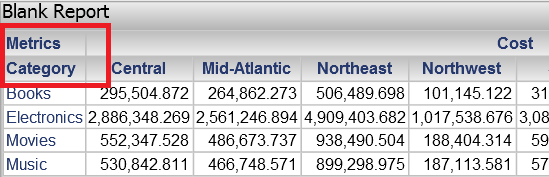
If Cost and Region were reversed in position, when viewed in the report, the word Metrics would be removed, but Region would then display. The option is removing the extra column, its intent is not to remove the word Metrics.
ACTION:
This is working by design in Strategy Web 9.x, Should the user want to remove all column headers, go to "Properties and Formatting" --> Grid --> Uncheck "Show" below columns.
