EducationSoftwareStrategy.com
StrategyCommunity

Knowledge Base

Product

Community

Knowledge Base

TopicsBrowse ArticlesDeveloper Zone

Product

Download SoftwareProduct DocumentationSecurity Hub

Education

Tutorial VideosSolution GalleryEducation courses

Community

GuidelinesGrandmastersEvents
x_social-icon_white.svglinkedin_social-icon_white.svg
Strategy logoCommunity

© Strategy Inc. All Rights Reserved.

LegalTerms of UsePrivacy Policy
  1. Home
  2. Topics

KB36103: How can facts be altered to add/remove source tables using Manual mapping through MicroStrategy Command Manager 9.4.x-10.x?


Community Admin

• Strategy


This knowledge base article explains the process of altering facts to add/remove source tables using Manual mapping through MicroStrategy Command Manager 9.4.x-10.x

Strategy Command Manager 9.4.x-10.x outline to alter existing facts cannot directly change their mapping to add/remove some source tables from the fact expressions. This can be achieved in two steps as:

  1. Remove the expression from the fact using the 'REMOVE EXPRESSION' outline.
  2. Add the expression back to the fact with only the required source tables using the 'ADD EXPRESSION' outline.

As an example, consider the fact 'Copy of Units Sold' defined as shown:

ka04W000000OehWQAS_0EM440000002Agg.png

Consider that this fact needs to be modified using Strategy Command Manager 9.4.x-10.x to use Manual mapping and remove the 'ORDER_DETAIL' fact table from the 'QTY_SOLD' expression. This can be achieved as:

  • Use the 'REMOVE EXPRESSION' outline to completely remove the 'QTY_SOLD' expression from the fact, as shown:
     
ka04W000000OehWQAS_0EM440000002Age.png
  •  

    
    REMOVE EXPRESSION "QTY_SOLD" FROM FACT "Copy of Units Sold" IN FOLDER "\Schema Objects\Facts" FROM PROJECT "Strategy Tutorial";


  • Add the expression back to the fact, and specify only the 'ORDER_FACT' source table as shown:
ka04W000000OehWQAS_0EM440000002AgX.png
  • 
    ADD EXPRESSION "QTY_SOLD" EXPSOURCETABLES "ORDER_FACT" OVERWRITE TO FACT "Copy of Units Sold" IN FOLDER "\Schema Objects\Facts" FOR PROJECT "Strategy Tutorial";  


This will change the mapping of the fact expression to Manual, and remove 'ORDER_DETAIL' as its source table, as shown:
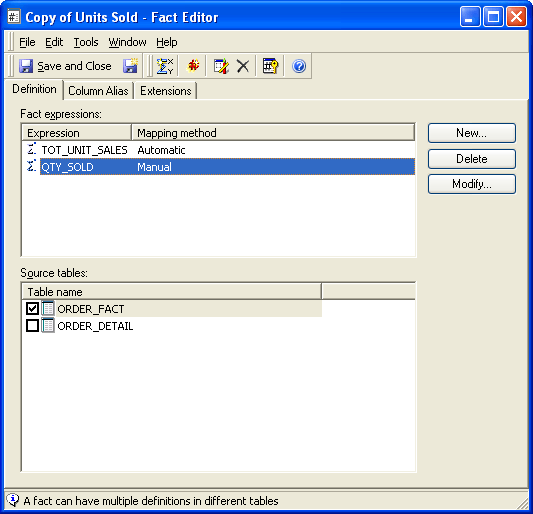
ka04W000000OehWQAS_0EM440000002Aga.png

Note: This approach cannot be used for facts which have only one expression whose source tables need to be changed. Removing the expression through Strategy Command Manager 9.4.x-10.x throws the following error:

ka04W000000OehWQAS_0EM440000002Agc.png


You cannot remove the only expression from the fact 'xxx'. Please delete the fact if you want to remove the expression.


Comment

0 comments

Details

Knowledge Article

Published:

June 7, 2017

Last Updated:

June 7, 2017