In Strategy SQL Generation Engine, partition fact tables in a Multi-Source environment are supported. With this feature, fact tables from different database instances can be utilized to create Metadata Partition Mappings.
EXAMPLE:
3 fact tables as below exist in the same project:

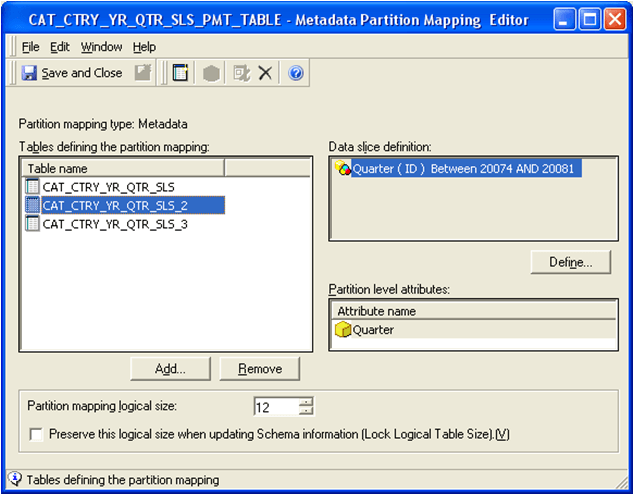

Teradata which holds CAT_CTRY_YR_QTR_SLS_3 is the primary database instance of this project. All the lookup tables exist in Teradata.
For a sample report with objects as below:
The SQL statement of this report is shown as below:
SQL Statements | Comments |
[DB Instance: Teradata] Pass0 - Duration: 0:00:00.09 Rows selected: 1 select count(*) WJXBFS1 from LU_QUARTER a21 where (a21.YEAR_ID in (2008) and a21.QUARTER_ID between 20061 and 20073) [DB Instance: Teradata] Pass1 - Duration: 0:00:00.01 Rows selected: 1 select count(*) WJXBFS1 from LU_QUARTER a21 where (a21.YEAR_ID in (2008) and a21.QUARTER_ID between 20074 and 20081) [DB Instance: Teradata] Pass2 - Duration: 0:00:00.03 Rows selected: 1 select count(*) WJXBFS1 from LU_QUARTER a21 where (a21.YEAR_ID in (2008) and a21.QUARTER_ID > 20081) | • The pre-queries query against Teradata DB instance since it is the primary database instance and lookup table LU_Quarter exists • The pre-queries compare the report filter with the 3 data slice definitions in 3 different passes • In this scenario, Partition 2 and 3 qualify since there is overlap between the report filter and the data slice definitions |
Pass3 - Duration: 0:00:00.23 select a11.CATEGORY_ID CATEGORY_ID, a11.COUNTRY_ID COUNTRY_ID, a11.QUARTER_ID QUARTER_ID, 0 XKYCGT, a11.TOT_DOLLAR_SALES WJXBFS1, a11.GROSS_DOLLAR_SALES WJXBFS2, a11.TOT_COST WJXBFS3 from CAT_CTRY_YR_QTR_SLS_2 a11 where a11.YEAR_ID in (2008) | Query against non-primary database instance in Oracle which holds partition table CAT_CTRY_YR_QTR_SLS_2. |
Pass 4 – Duration create volatile table ZZPO01, no fallback, no log( CATEGORY_ID FLOAT, COUNTRY_ID FLOAT, QUARTER_ID FLOAT, XKYCGT INTEGER, WJXBFS1 FLOAT, WJXBFS2 FLOAT, WJXBFS3 FLOAT) primary index (CATEGORY_ID, COUNTRY_ID, QUARTER_ID, XKYCGT) on commit preserve rows | Create a temp table in Teradata to insert results from Oracle as Teradata is the project’s primary DB instance. |
[DB Instance: Teradata] | Insert results of Pass3 into the temp table in Pass 4 with the assist of Analytical Engine, which is the KEY step to realize this new multi-source feature. |
[DB Instance: Teradata] Pass6 - Duration: 0:00:00.06 insert into ZZPO01 select a11.CATEGORY_ID CATEGORY_ID, a11.COUNTRY_ID COUNTRY_ID, a11.QUARTER_ID QUARTER_ID, 2 XKYCGT, a11.TOT_DOLLAR_SALES WJXBFS1, a11.GROSS_DOLLAR_SALES WJXBFS2, a11.TOT_COST WJXBFS3 from CAT_CTRY_YR_QTR_SLS_3 a11 where a11.YEAR_ID in (2008) | • Query against primary database instance in Teradata which holds partition table CAT_CTRY_YR_QTR_SLS_3. • This query insert the data into the same temp table as that in Pass 5. |
[DB Instance: Teradata] Pass7 – … | Final join pass in primary database instance. |
