EducationSoftwareStrategy.com
StrategyCommunity

Knowledge Base

Product

Community

Knowledge Base

TopicsBrowse ArticlesDeveloper Zone

Product

Download SoftwareProduct DocumentationSecurity Hub

Education

Tutorial VideosSolution GalleryEducation courses

Community

GuidelinesGrandmastersEvents
x_social-icon_white.svglinkedin_social-icon_white.svg
Strategy logoCommunity

© Strategy Inc. All Rights Reserved.

LegalTerms of UsePrivacy Policy
  1. Home
  2. Topics

KB36167: How to create an Object Manager package from the command line?


Community Admin

• Strategy


This knowledge base article documents the process to create an Object Manager package from the command line.

Users may want to schedule the creation of an update package at a later time, so that the project is not locked during normal business hours. Or the user may want to create a package containing certain objects on a specific schedule. For example, the user may want to create a new package every week that contains all the new metrics from the development project.
 
First, the user needs to use Strategy Object Manager to create an XML file specifying what objects are to be included in the update package. That XML file can then be used to create the package from the command line.The XML file specifies a container object in the source project, that is, a folder, search object, or object prompt.
 
To create an XML file for creating an update package from the command line:
  • In Object Manager, log in to a project.
  • From the Tools menu, select Create Package. The Create Package dialog box opens.
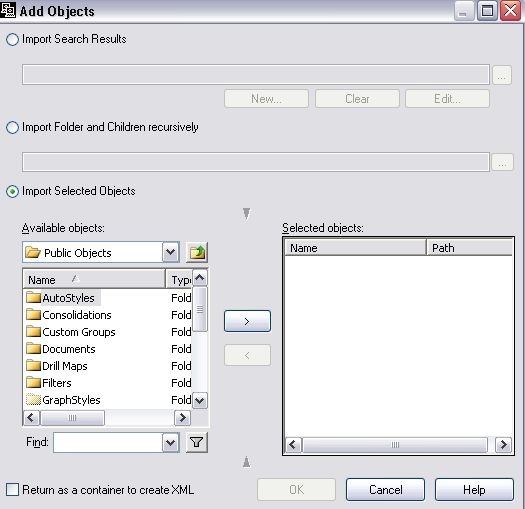
  • Click Add. The Add Objects dialog box opens. 
     
ka04W000001488iQAA_0EM440000002Dlb.jpeg
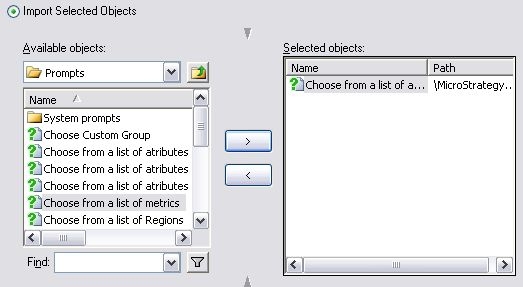
  • Specify what to use as a container object. Use a search object, object prompt, or folder. To specify a search object or object prompt as the container object:
     

    a. Make sure the Import selected objects option is selected.
    b.In the Available objects area, browse to the search object or object prompt.
    c.Select the search object or object prompt and click >.
     
ka04W000001488iQAA_0EM440000002Dlc.jpeg
  • OR, to specify a folder as the container object:
     
    a. Select the Import folder and children recursively option.
    b. Type the name of the folder in the field, or click ... (the browse button) and browse to the folder.
     
ka04W000001488iQAA_0EM440000002Dlx.jpeg
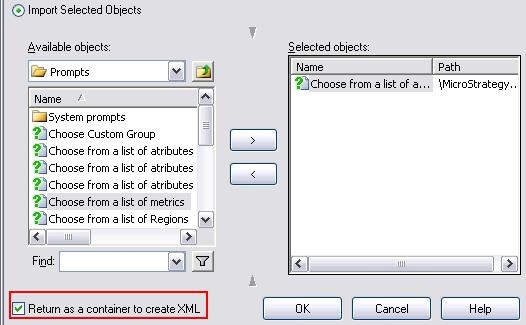
  • Select the Return as a container to create XML check box.
     
ka04W000001488iQAA_0EM440000002Dle.jpeg
  • Click OK. The Add Objects dialog box closes.
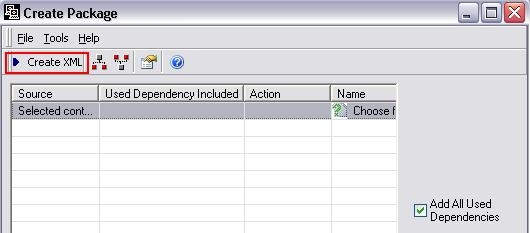
  • To add the dependents of all objects to the package, select the Add all used dependencies check box. All dependent objects of all objects included in the container object will be included in the package when it is created.
    Warning: If the dependent objects for a specific object do not exist in either the destination project or in the update package, the update package cannot be applied. If you choose not to include dependent objects in the package, make sure that all dependent objects are included in the destination project.
  • Select the schema update options for this package.
  • Select the ACL options for objects in this package.
  • Enter the name and location of the package file to be created by this XML in the Save In field. The default file extension for update packages is .mmp.
  • Click Create XML. You are prompted to type the name and location of the XML file. By default, this is the same as the name and location of the package file, with an .xml extension instead of .mmp.
     
ka04W000001488iQAA_0EM440000002Dll.jpeg
  • Click Save. The XML file is saved.

To create an update package from an XML file
Call the Project Merge executable, projectmerge.exe, with the following parameters:

  • Use this XML file to create an update package (required): -fFilename.xml
  • Log into the project source with this password (the login ID to be used is stored in the XML file): -spPassword
  • Log into the project with this password (the login ID to be used is stored in the XML file): -smpPassword
  • Suppress status updates (useful for creating an update package in the background, so that the status window does not appear): -sup  

NOTE: Creating a package from the command line locks the project metadata for the duration of the package creation. Other users cannot make any changes to the project until it becomes unlocked.


Comment

0 comments

Details

Knowledge Article

Published:

April 5, 2017

Last Updated:

October 15, 2019