EducationSoftwareStrategy.com
StrategyCommunity

Knowledge Base

Product

Community

Knowledge Base

TopicsBrowse ArticlesDeveloper Zone

Product

Download SoftwareProduct DocumentationSecurity Hub

Education

Tutorial VideosSolution GalleryEducation courses

Community

GuidelinesGrandmastersEvents
x_social-icon_white.svglinkedin_social-icon_white.svg
Strategy logoCommunity

© Strategy Inc. All Rights Reserved.

LegalTerms of UsePrivacy Policy
  1. Home
  2. Topics

KB36184: In MicroStrategy Developer 9.x and 10.x the color mode graph option to ‘color by categories’ doesn't work with combination graph style.


Stefan Zepeda

Salesforce Solutions Architect • Strategy


In MicroStrategy Developer 9.x and 10.x the color mode graph option to ‘color by categories’ doesn't work with combination graph style.

SYMPTOM:
The following steps were used to reproduce the issue in Strategy Tutorial  9.x and 10.x:

  • Create a report with Region, Revenue, and Profit.
  • Run the report as ‘Vertical Bar Clustered’ graph.
  • Go to Graph Preferences-> Vertical Bar Options-> Display-> change the Color Mode to 'Color by Categories'.

ka02R000000kVqbQAE_0EM440000002DlZ.jpeg
  • Run the report in graph mode and notice the results below:

ka02R000000kVqbQAE_0EM440000002DlL.jpeg
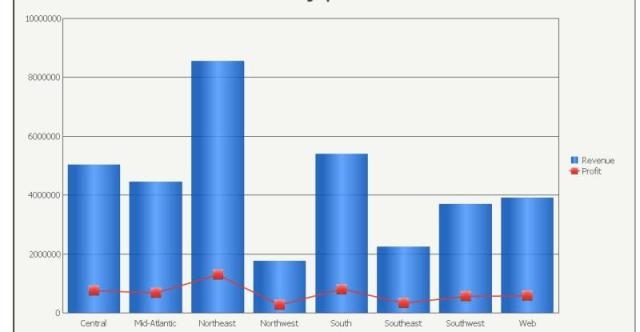
  • Now change the graph style to ‘Combination Bar Line’.

ka02R000000kVqbQAE_0EM440000002DlY.jpeg
  • Run the report and notice the color scheme disappear

ka02R000000kVqbQAE_0EM440000002DlU.jpeg

CAUSE:
This is a known issue and logged with our Technology department.
 
ACTION:
Please contact the Strategy Technical Support for an update on this case.


Comment

0 comments

Details

Knowledge Article

Published:

May 22, 2017

Last Updated:

May 22, 2017