EducationSoftwareStrategy.com
StrategyCommunity

Knowledge Base

Product

Community

Knowledge Base

TopicsBrowse ArticlesDeveloper Zone

Product

Download SoftwareProduct DocumentationSecurity Hub

Education

Tutorial VideosSolution GalleryEducation courses

Community

GuidelinesGrandmastersEvents
x_social-icon_white.svglinkedin_social-icon_white.svg
Strategy logoCommunity

© Strategy Inc. All Rights Reserved.

LegalTerms of UsePrivacy Policy
  1. Home
  2. Topics

KB36208: How to disable the System Hierarchy option while drilling on a Report Services document using a drill map that contains templates in MicroStrategy Web 10.x


Community Admin

• Strategy


This technical note explains how to disable the System Hierarchy option from appearing in the drill-to list.

By default, drilling on a Strategy Report Services document using a drill map that contains templates will display the list of the templates in the drill map under a System Hierarchy option. This technical note explains how to disable the System Hierarchy option from appearing in the drill-to list.
STEPS TO REPRODUCE:
  • Create a report with the Month attribute and save it.
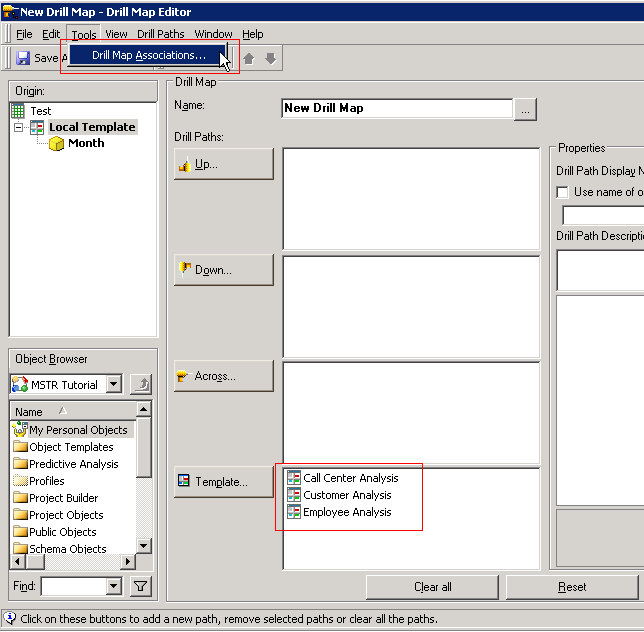
  • Create a Drill map and link to the above report and include a couple of templates in the Drill Map.  For this example, Call Center Analysis, Customer Analysis, and Employee Analysis were used:

ka04W00000147rEQAQ_0EM4400000027g4.png
  • Create a Report Services document and use the above report as a dataset and save the document
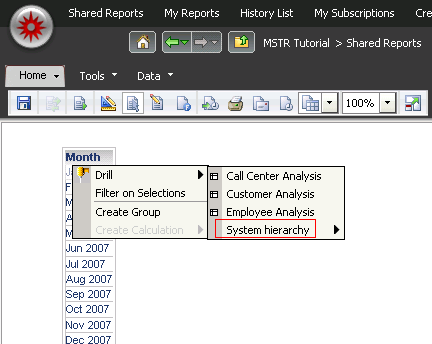
  • In Strategy Web, run the document.  Right click on the 'Month' attribute and drill.  The templates will be shown along with the System Hierarchy option:

ka04W00000147rEQAQ_0EM4400000027g6.png
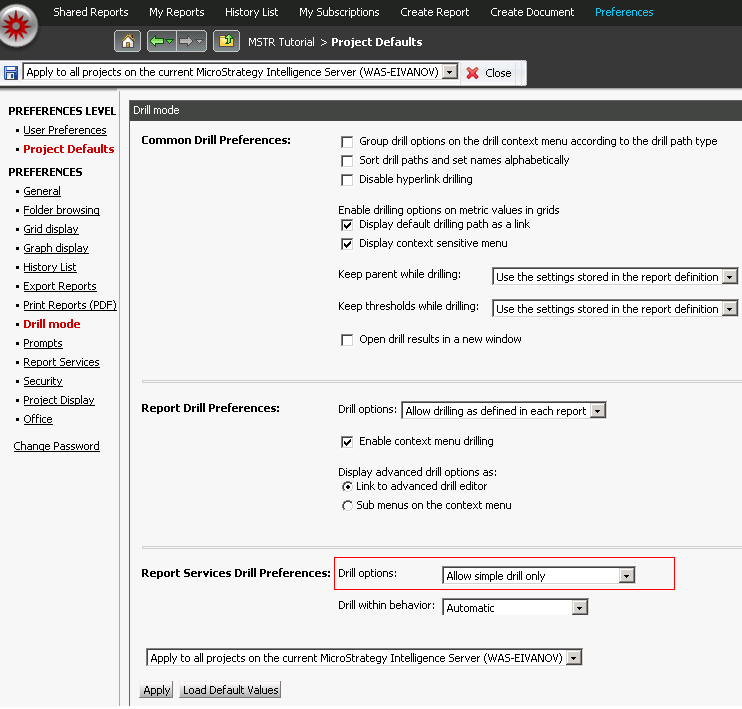
  • Go the Strategy Web Administrator page, and choose Project Defaults -> Drill Mode.  Navigate to Report Services Drill Preferences and change the Drill option to 'Allow Simple Drill Only'.

ka04W00000147rEQAQ_0EM4400000027g5.png
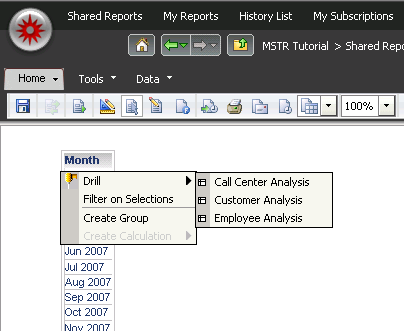
  • Execute the dashboard from Strategy Web again.  Notice that 'System Hierarchy' is not available.

ka04W00000147rEQAQ_0EM4400000027g3.png

Comment

0 comments

Details

Knowledge Article

Published:

April 18, 2017

Last Updated:

June 25, 2019