EducationSoftwareStrategy.com
StrategyCommunity

Knowledge Base

Product

Community

Knowledge Base

TopicsBrowse ArticlesDeveloper Zone

Product

Download SoftwareProduct DocumentationSecurity Hub

Education

Tutorial VideosSolution GalleryEducation courses

Community

GuidelinesGrandmastersEvents
x_social-icon_white.svglinkedin_social-icon_white.svg
Strategy logoCommunity

© Strategy Inc. All Rights Reserved.

LegalTerms of UsePrivacy Policy
  1. Home
  2. Topics

KB36220: What privilege should be granted to a user to be able to modify the properties of a widget in MicroStrategy Web 9.x?


Community Admin

Placeholder •


A user needs to have the Web Professional privilege 'Web format grid and graph' granted in order to have the ability to edit the properties of a widget in MicroStrategy Web 9.x.

 
A user needs to have the Web Professional privilege 'Web format grid and graph' granted in order to have the ability to edit the properties of a widget in Strategy Web 9.x. When the required privilege is not granted the right-menu click on a widget in Strategy Web looks like the following:


ka04W000000OdQwQAK_0EM4400000027fa.jpeg


 To enable this privilege, do the following:
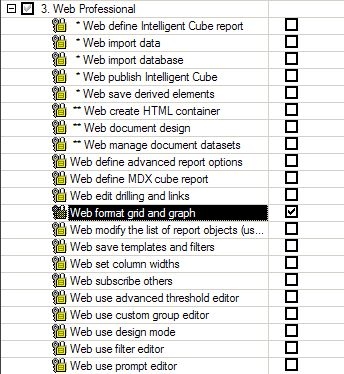
  • In Strategy Developer, edit the user/user group.
  • Click on Project Access and locate the privilege 'Web format grid and graph under the Web Professional level.

ka04W000000OdQwQAK_0EM4400000027fo.jpeg
  • Use the user login credentials to log into Web.
  • Re-execute the same document and the result should look like the following:

ka04W000000OdQwQAK_0EM4400000027fn.jpeg


Comment

0 comments

Details

Knowledge Article

Published:

June 22, 2017

Last Updated:

June 22, 2017