EducationSoftwareStrategy.com
StrategyCommunity

Knowledge Base

Product

Community

Knowledge Base

TopicsBrowse ArticlesDeveloper Zone

Product

Download SoftwareProduct DocumentationSecurity Hub

Education

Tutorial VideosSolution GalleryEducation courses

Community

GuidelinesGrandmastersEvents
x_social-icon_white.svglinkedin_social-icon_white.svg
Strategy logoCommunity

© Strategy Inc. All Rights Reserved.

LegalTerms of UsePrivacy Policy
  1. Home
  2. Topics

KB36277: How to increase text size for inserting large SQL statements in IS_REP_SQL_STATS table for statistics repository residing on a Sybase ASE in MicroStrategy Intelligence Server?


Community Admin

• Strategy


How to increase text size for inserting large SQL statements in IS_REP_SQL_STATS table for statistics repository residing on a Sybase ASE in MicroStrategy Intelligence Server?

In Strategy Intelligence Server 9.x, the datatype of SQLSTATEMENT column in IS_REP_SQL_STATS table is changed to varchar(4000) for statistics repository from the datatype text in Strategy Intelligence Server 8.1.x. But Sybase ASE has a limitation of 32 KB as default for text datatype.
  
To insert large SQL statements in IS_REP_SQL_STATS table for statistics repository residing on a Sybase ASE, the following Sybase ASE session level option can be used:
 
Sample Code/Error
set textsize xxxxxxxx
  
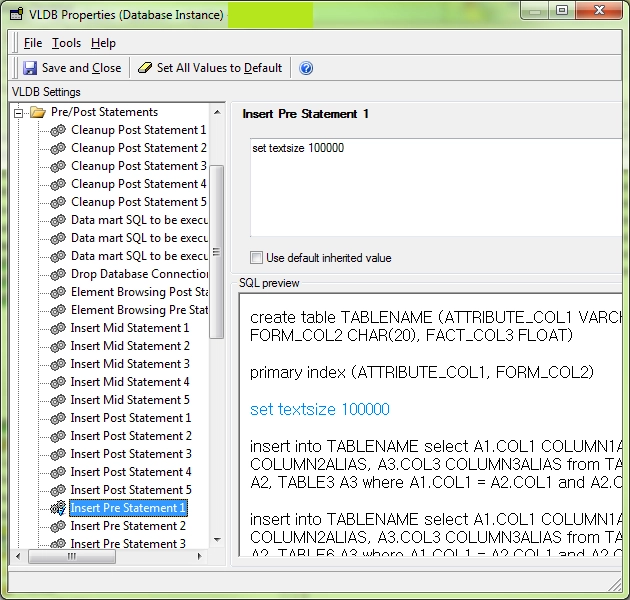
To increase text size that more than the default size (32KB), "set textsize" command should be added in VLDB properties of Statistics Database Instance > Pre/Post Statement > Insert Pre Statement 1, as shown below:
 

ka04W00000148xmQAA_0EM440000002AYt.png

 
Refer to the following technical note for more details of the similar topic:
 
KB13395: Large SQL statements are truncated when logged into the SQLSTATEMENT column in IS_REP_SQL_STATS table of a Statistics repository residing on an Oracle database in MicroStrategy Intelligence Server


Comment

0 comments

Details

Knowledge Article

Published:

June 13, 2017

Last Updated:

June 13, 2017