EducationSoftwareStrategy.com
StrategyCommunity

Knowledge Base

Product

Community

Knowledge Base

TopicsBrowse ArticlesDeveloper Zone

Product

Download SoftwareProduct DocumentationSecurity Hub

Education

Tutorial VideosSolution GalleryEducation courses

Community

GuidelinesGrandmastersEvents
x_social-icon_white.svglinkedin_social-icon_white.svg
Strategy logoCommunity

© Strategy Inc. All Rights Reserved.

LegalTerms of UsePrivacy Policy
  1. Home
  2. Topics

KB36279: Error "This Project object cannot be locked because one or more of its constituents have conflicting locks placed on them." occurs when executing the script of updating schema in MicroStrategy Command Manager 2021


Community Admin

• Strategy


Error "This Project object cannot be locked because one or more of its constituents have conflicting locks placed on them." occurs when executing the script of updating schema in MicroStrategy Command Manager 2021.

SYMPTOM:
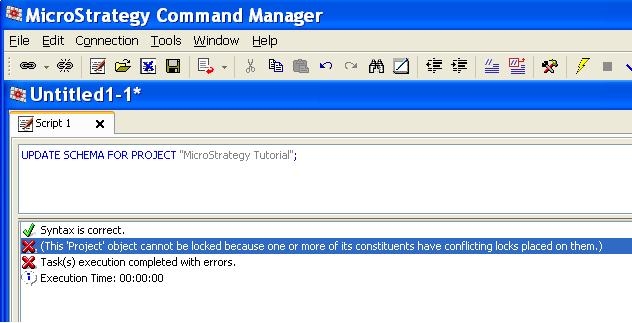
The below error occurs when executing the script "UPDATE SCHEMA" in Strategy Command Manager 2021:
 

ka0PW00000010ArYAI_0EM440000002Aev.jpeg

 
Sample Code/Error
This 'Project' object cannot be locked because one or more of its constituents have conflicting locks placed on them.
Task(s) execution completed with errors.
  
CAUSE:
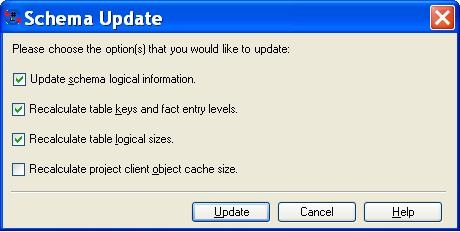
This error indicates that the Update Schema window for the mentioned project is open in Strategy Developer. The Update Schema window places a lock and prevents schema updating from Command Manager.
ka0PW00000010ArYAI_0EM440000002Af3.jpeg

 
ACTION:
Close the Update Schema window in Strategy Developer and re-execute the command in Strategy Command Manager.


Comment

0 comments

Details

Knowledge Article

Published:

June 3, 2017

Last Updated:

February 27, 2024