EducationSoftwareStrategy.com
StrategyCommunity

Knowledge Base

Product

Community

Knowledge Base

TopicsBrowse ArticlesDeveloper Zone

Product

Download SoftwareProduct DocumentationSecurity Hub

Education

Tutorial VideosSolution GalleryEducation courses

Community

GuidelinesGrandmastersEvents
x_social-icon_white.svglinkedin_social-icon_white.svg
Strategy logoCommunity

© Strategy Inc. All Rights Reserved.

LegalTerms of UsePrivacy Policy
  1. Home
  2. Topics

KB36305: How to avoid the checking of JVM Maximum Heap Size for Web Universal JSP when using ASPx in MicroStrategy Health Center 9.x.


Community Admin

• Strategy


This KB article describes how to avoid the checking of JVM Maximum Heap Size for Web Universal JSP when using ASPx in MicroStrategy Health Center 9.x.

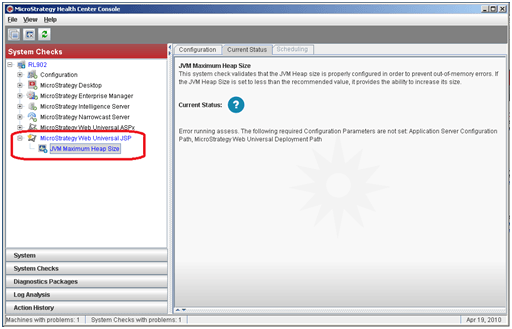
Strategy Health Center performs checks according to the components installed on the monitored machine. Thus, if during the Strategy installation the Strategy Web Server (JSP) component was installed together, then the JVM Maximum Heap Size for Web Universal JSP will be checked as follows:
ka04W000000OemAQAS_0EM440000002Aae.png

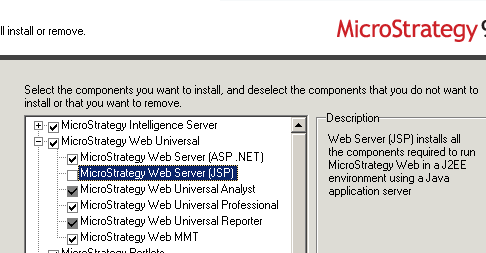
In order to prevent Strategy Health Center from performing the check, change the Strategy installation and uninstall the Strategy Web Server (JSP) feature:
ka04W000000OemAQAS_0EM440000002Aac.png

Comment

0 comments

Details

Knowledge Article

Published:

June 6, 2017

Last Updated:

June 6, 2017