EducationSoftwareStrategy.com
StrategyCommunity

Knowledge Base

Product

Community

Knowledge Base

TopicsBrowse ArticlesDeveloper Zone

Product

Download SoftwareProduct DocumentationSecurity Hub

Education

Tutorial VideosSolution GalleryEducation courses

Community

GuidelinesGrandmastersEvents
x_social-icon_white.svglinkedin_social-icon_white.svg
Strategy logoCommunity

© Strategy Inc. All Rights Reserved.

LegalTerms of UsePrivacy Policy
  1. Home
  2. Topics

KB36315: An empty XML-API log file appears in MicroStrategy Web log path when XML-API logger is enabled in MicroStrategy Web 9.x


Community Admin

• Strategy


An empty XML-API log file appears in MicroStrategy Web log path when XML-API logger is enabled in MicroStrategy Web.

SYMPTOM:
An empty XML-API log file appears in Strategy Web log path when XML-APPI logger is enabled in Strategy Web 9.x, as shown in the image below;
 

ka04W000000OdyiQAC_0EM4400000027fS.jpeg

 
CAUSE:
A possible cause of the issue is that the user ID is entered in "User name" field in Web Administrator > Diagnostics > Configuration > Advanced Logger Options, as shown in the image below:
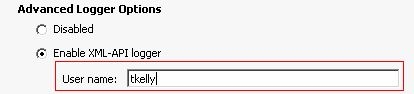
 

ka04W000000OdyiQAC_0EM4400000027fE.jpeg

 
ACTION:
In "User name" field, enter the full name of the Web user instead of the user ID, this will log messages that are generated specifically by this user, as shown in the image below:
 

ka04W000000OdyiQAC_0EM4400000027fR.jpeg

 
For more information regarding Strategy Web XML-API log, refer to the following technical note:

  • KB9836: How is the XML-API Web log enabled in Strategy Web

Comment

0 comments

Details

Knowledge Article

Published:

June 14, 2017

Last Updated:

June 14, 2017