EducationSoftwareStrategy.com
StrategyCommunity

Knowledge Base

Product

Community

Knowledge Base

TopicsBrowse ArticlesDeveloper Zone

Product

Download SoftwareProduct DocumentationSecurity Hub

Education

Tutorial VideosSolution GalleryEducation courses

Community

GuidelinesGrandmastersEvents
x_social-icon_white.svglinkedin_social-icon_white.svg
Strategy logoCommunity

© Strategy Inc. All Rights Reserved.

LegalTerms of UsePrivacy Policy
  1. Home
  2. Topics

KB36394: "'Transmission to primary location failed. Backup location is not enabled." error occurs when using the "%20" encoding for the space character in the file path name for a MicroStrategy Distribution Services 9.x and 10.x subscription


Community Admin

• Strategy


"'Transmission to primary location failed. Backup location is not enabled." error occurs when using the "%20" encoding for the space character in the file path name for a MicroStrategy Distribution Services 9.x and 10.x subscription

SYMPTOM:
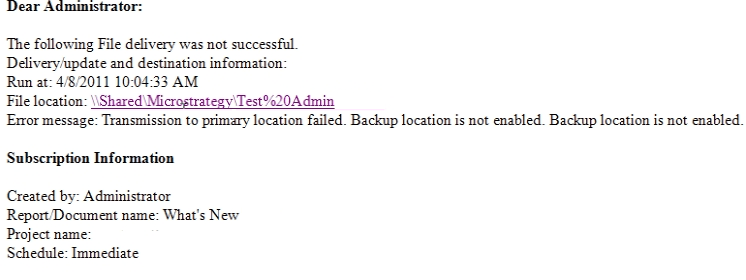
When creating a file subscription in Strategy Distribution Services 9.x and 10.x using the "%20" encoding for a space character, the notification email file location hyperlink is correct, but the file does not exist on the system and the email notes that the delivery failed for the primary location:
 

ka04W000000Oh6kQAC_0EM440000002AeO.png


The following File delivery was not successful.
[...]
Error message: Transmission to primary location failed. Backup location is not enabled. Backup location is not enabled.

 
CAUSE:
This is a known issue with Strategy Distribution Services 9.x and 10.x where the "%20" character encoding is not properly converted into a space in the file name.
 
ACTION:
Strategy will continue to investigate and post updates as soon as they are available.
 
WORKAROUND:
Remove the "%20" and do not use spaces in file name or path.


Comment

0 comments

Details

Knowledge Article

Published:

June 4, 2017

Last Updated:

June 4, 2017