EducationSoftwareStrategy.com
StrategyCommunity

Knowledge Base

Product

Community

Knowledge Base

TopicsBrowse ArticlesDeveloper Zone

Product

Download SoftwareProduct DocumentationSecurity Hub

Education

Tutorial VideosSolution GalleryEducation courses

Community

GuidelinesGrandmastersEvents
x_social-icon_white.svglinkedin_social-icon_white.svg
Strategy logoCommunity

© Strategy Inc. All Rights Reserved.

LegalTerms of UsePrivacy Policy
  1. Home
  2. Topics

KB36406: Filter panel in the dashboard editor in MicroStrategy Web


Community Admin

• Strategy


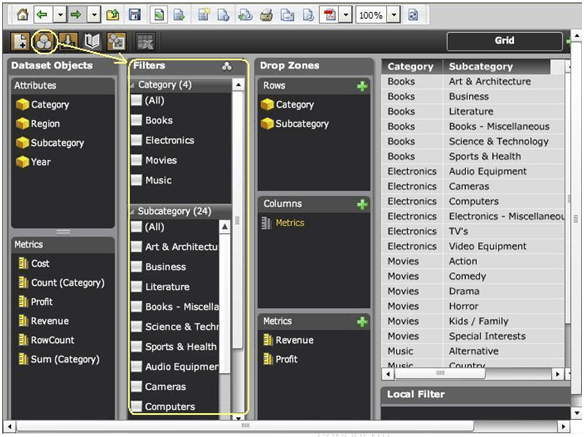
Filter panel in the dashboard editor in MicroStrategy Web allows users to apply filters on the attributes and metrics.

Filter panel in the dashboard editor in Strategy Web allows users to apply filters on the attributes and metrics.
ka04W000000OdLHQA0_0EM4400000027e4.png

 
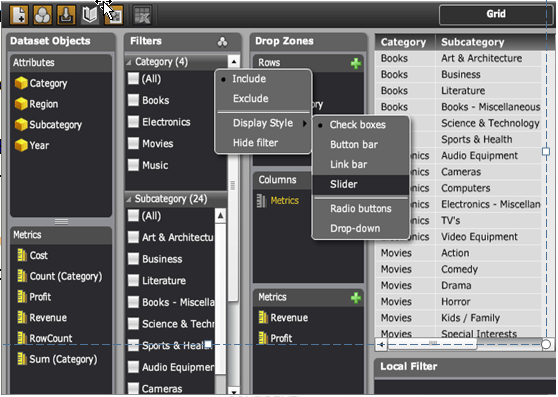
Filters within the filter panel can be expanded, collapsed and re-arranged. Users can also choose to display each filter in a different style as shown below,
ka04W000000OdLHQA0_0EM4400000027eD.png

 
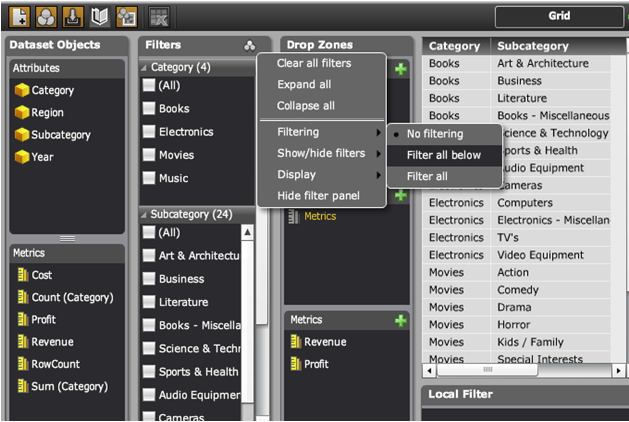
Users can select how each filter selector can target other filter selectors in the filter panel using the following three modes
ka04W000000OdLHQA0_0EM4400000027eA.png
  • No Filtering – Selectors do not target each other.
  • Filter all below – Selectors only target the selectors that are positioned below.
  • Filter all – Selectors target one another irrespective of their position.

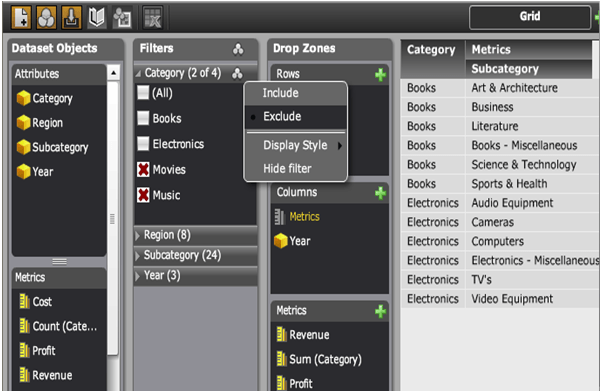
Users also have an option to select  whether to incllude or exclude the chosen selections from each filter selector as shown below,
 

ka04W000000OdLHQA0_0EM4400000027e8.png


  • Include – Treats the user selection as an In List.
  • Exclude – Converts the user selection to a Not In List.


Comment

0 comments

Details

Knowledge Article

Published:

June 22, 2017

Last Updated:

June 22, 2017