EducationSoftwareStrategy.com
StrategyCommunity

Knowledge Base

Product

Community

Knowledge Base

TopicsBrowse ArticlesDeveloper Zone

Product

Download SoftwareProduct DocumentationSecurity Hub

Education

Tutorial VideosSolution GalleryEducation courses

Community

GuidelinesGrandmastersEvents
x_social-icon_white.svglinkedin_social-icon_white.svg
Strategy logoCommunity

© Strategy Inc. All Rights Reserved.

LegalTerms of UsePrivacy Policy
  1. Home
  2. Topics

KB36418: How to terminate the Master Health Agent or Health Agent process in UNIX/Linux or Windows.


Community Admin

• Strategy


Some times it may be necessary to force the MicroStrategy Master Health Agent or Health Agent to stop. The following procedure is not generally recommended and all attempts to stop the tool using standard processes should be performed first. In the event that the tool does not stop appropriately, it may be necessary to manually terminate the underlying processes following the instructions included here.

Some times it may be necessary to force the Strategy Master Health Agent or Health Agent to stop. The following procedure is not generally recommended and all attempts to stop the tool using standard processes should be performed first. If there are issues stopping or starting the Strategy Master Health Agent or Health Agent processes contact Strategy Technical Support.
In the event that the tool does not stop appropriately, it may be necessary to manually terminate the underlying processes.
 
On UNIX/Linux

  • Locate the Health Center process by using the following command:
ka04W000000OfNtQAK_0EM440000002AeX.png
  •  
    
    ps -ef | grep HealthCenter


  • Terminate the process by sending it a SIGKILL signal to it (be aware that processes cannot catch this type of signal so it will terminate without generating any messages), both of the following commands are equivalent:


    kill -9 PID
    kill -SIGKILL PID


    Where PID is the process ID identified in step one.

 
On Windows

  • Open 'Services' under Administrative Tools.
  • Locate the Health Center processes:
ka04W000000OfNtQAK_0EM440000002AeT.jpeg
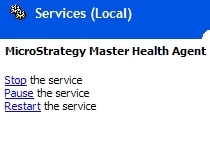
  • Terminate the process by clicking on the process and selecting 'Stop' in  the top left:
ka04W000000OfNtQAK_0EM440000002AeR.jpeg


Comment

0 comments

Details

Knowledge Article

Published:

March 31, 2017

Last Updated:

March 31, 2017