EducationSoftwareStrategy.com
StrategyCommunity

Knowledge Base

Product

Community

Knowledge Base

TopicsBrowse ArticlesDeveloper Zone

Product

Download SoftwareProduct DocumentationSecurity Hub

Education

Tutorial VideosSolution GalleryEducation courses

Community

GuidelinesGrandmastersEvents
x_social-icon_white.svglinkedin_social-icon_white.svg
Strategy logoCommunity

© Strategy Inc. All Rights Reserved.

LegalTerms of UsePrivacy Policy
  1. Home
  2. Topics

KB36443: Menu and toolbar disappears from report and Report Services document in MicroStrategy Web Universal


Community Admin

• Strategy


Menu and toolbar disappears from report and Report Services document in MicroStrategy Web Universal

SYMPTOM:
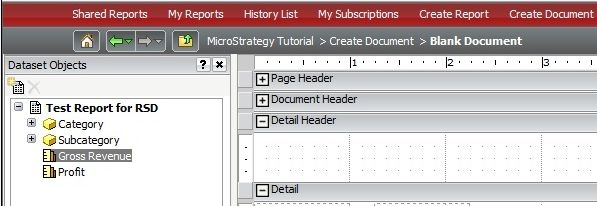
In Strategy Web, menu and toolbar disappears from reports and Report Services documents, as shown below:
 

ka04W000000OdtjQAC_0EM4400000027e9.jpeg

 
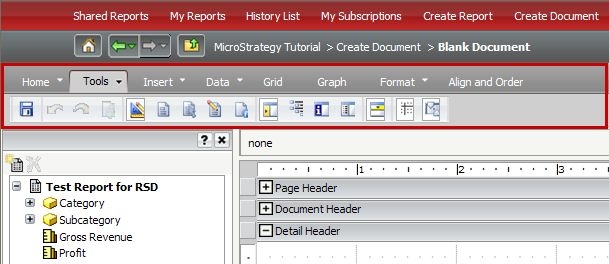
The correct report or Report Services document page including menu and toolbar should be as shown below:
 

ka04W000000OdtjQAC_0EM4400000027eB.jpeg

 
CAUSE:
One of the cause is that Strategy Web is not deployed correctly.
 
 
ACTION:
Deploy Strategy Web Universal again. 
 
For more information on how to deploy Strategy Web Universal, refer to the Installation and Configuration Guide Product Manual for the specific Strategy version of Web Universal that will be deployed. Information on various deployments can be found in Chapter 6: Deploying Strategy Web and Web Universal.
 
A similar issue can be observed in Strategy 9.3.0 due to Internet Explorer compatibility mode. Please refer to TN42784 - The toolbar for a Report Services Document disappears after the cursor hovers over it in MicroStrategy Web 9.3.0 and Internet Explorer for further information.


Comment

0 comments

Details

Knowledge Article

Published:

June 15, 2017

Last Updated:

June 15, 2017